Why Drupal is a perfect fit for Building Mobile Compatible website

The increasing popularity of mobile internet and high competition in the business world has made it virtually impossible for  any marketers, organizations, corporates and advertisers to exist without a Mobile compatible website.

Nowadays even busy consumers are converting their non - productive time into value added activities using their Smartphone. With all services and necessities just a click away that to with a high speed data device, it is possible to stay connected with all the customers anywhere anytime.

Do you want your organization to be tossed aside in this competitive world? If your answer is no, then it is the right time to take advantage of the mobile Technology. After all you have to take decisions based on the interests of your targeted customers.

Why choose drupal for Mobile Friendly Website

There is no doubt that Drupal CMS is one of the most powerful and popular open source platform. With Drupal it is easy to manage, publish and organize wide variety of contents.

But the most inevitable advantage of choosing  drupal is that, it works well for almost all devices including iPhone, iPad, android and even blackberry. With each improved version of Drupal from Drupal 7 to the latest Drupal 8, the focus is centered around a “Mobile first architecture“. So it meets even the future needs of Mobile Experience.

Apart from that Drupal provides some unique and mobile friendly themes and templates which are easier to use. It also provides additional tools useful for Mobile Websites like Mobile Tool module which inform users that a mobile version of the website is available.

With high security features of Drupal, it is possible to overcome almost all common security risks and attacks providing long time business security.

Options available to make mobile friendly website using drupal

Native Smartphone Applications

To identify the best way to provide contents on a smartphone, it is necessary that the mobile application has to meet the content requirements. With Drupal, building mobile apps has become easier and less confusing. 

For Drupal sites, an open source mobile application development kit Drupal Gap is usually used. With Drupal Gap, it is easier to create and customize multi-platform Drupal mobile app that can communicate with the websites.

Such applications can be easily installed on almost all mobile devices. Once installed these mobile applications can be interfaced with Drupal Gap enabled site.

Native smartphones applications that provide unique and useful services, developed for mobile devices can produce high popularity and revenue potential. The distribution and subscription of apps can be done through the appstore or even the Google Play itself. 

Also It opens up the application to all features of the mobile devices including GPS system, accelerometer, compass, map, gyroscope, text, video, camera and voice features. 

Native apps can be configured to cache data locally, so even if device is out of range, applications works effectively.

Native apps using web services to retrieve data

The best method to retrieve data in this way is using native apps to contact drupal website through web services. It is simpler and Offloads much of data processing to Drupal Website. Also as data is stored in cloud, There is no need to redeploy new version of native application. 

Usually Native application provide interface through native API. But since data can come from Drupal website, it allows users to access and update contents from any device.

Responsive web design

Can you imagine to read a full Website or even a single line on a mobile without any finger zooming? But so many finger zooming can make the users frustrated. 
As per google reports more than half of Mobile users do not wish to revisit a website without a non-mobile theme. 

There comes the role of Responsive Web design. It delivers Optimal viewing experience and easy navigation regardless of the size of user display, limitations or capabilities of the device being used. Drupal provides backing for web services as well as responsive web design. 

Responsive themes use media queries to serve CSS. These media queries work in real time, so when a viewer rotates his smartphone, the media query updates the style sheets simultaneously to accommodate the full width of the device.

Responsive themes usually loads lower bandwidth items first in order to avoid any lag that occur while loading a webpage. Then when the media queries detect a larger screen display, it adds heavier graphics elements. Another advantage of responsive web design is the quick transition of legacy websites.  

The most common and powerful Drupal themes are OmegaAdaptivetheme and Arctica. It reduces formatting of your Drupal website to meet your mobile device requirements. 

Third party Gateways such as mobify

Third party Gateways play the role of a mediator between your existing site and mobile browser interface. Mobify is one such gateway which integrates with your existing website. If your organization need to build mobile capability without redesigning your website, then mobify helps 
you in that. 

Thus Drupal helps in simplifying and speeding up Theme development process with its modules and tools. Hence making it easy to serve mobile-optimized content.

As in the upcoming years, all what we need is, one site , one theme with simpler CSS and no duplicate content issues. This can be achieved using Drupal.

Valuebound is a leading Drupal development company based in Bangalore. Contact us for more information on how to create mobile compatible Website.

References:

http://digett.com/blog/05/24/2010/mobilize-your-drupal-site-mobile-tools
http://www.slideshare.net/ChadHart2/mobile-web-withdrupal
http://www.mobify.com/resources/mobify-drupal-plugin/

Create Personalized E Commerce Experience With Drupal

Personalization enhances your online business. The experts say that decisions have to be taken based on the customer data and their preferences when it comes to product recommendations or home page landscape alteration for the shortlisted customers. Customers from different geographical locations order for the products either in person or online. You need to make sure that the shoppers find your product easy to get a compelling digital experience.

How to create a personalized e-commerce shopping experience

To create a personalized e-commerce experience, you need to develop the content (products / pages / images / product video / comments / testimonials …) strategy that is relevant to the end users. It is necessary to find what customers need. The required content and the form should be designed with right questions in which the customer can share their shopping experience. If your website enables the customers to navigate for specific keywords, it narrows down their search which gives them personalized shopping experience. You can enable personalization in different phases phases.

  • Personalization of navigation structure - This is the most important and basic phase of personalization. When a shopper clicks on an item, the website should display the categories of the selected item. E.g. if the user clicks on the books, it should display the categories related to books. Drupal CMS has a powerful menu system in which you can add, modify and remove the submenus as per your online visitor click behaviour. Few modules which can be used to achieve this - Context Menu BlockPersonalizeMenu per Role.
     
  • Personalizing based on customer’s behaviour -  Order history and customer exact requirements play an important role in personalized shopping experience. Customers have various product requirements which have to be grouped in a segment, taking the front-end (website) and back-end systems (database) performances into consideration. Commerce Recommender which gives personalized products recommendations based on customers purchasing history.  Browsing History Recommender module can give personal recommendation, based on what each user has read the content so far. There is Fivestar Recommender module which can create four different blocks - Similar nodes (by votes), Recommendations (from similar nodes), Similar users (by votes), Recommendations (from similar users).
     
  • Personalize using external data source - Personalization can be improved further utilizing shopper location, social network feeds and other factors such as weather to their full advantage. This can be done using a custom Personalize engine developed for your store. Drupal provides excellent integration with Nostro, The Plug-n-Play Recommendation Engine using Nosto Tagging for Drupal Commerce module.
     
  • Personalize by foreseeing customer needs - This phase should be implemented once basic level of personalization is in place on your ecommerce store. This enables the organization to visualize the customer requirements in advance and personalize them accordingly. Commerce Reporting provides a reporting system to Drupal Commerce having features like Sales Report, Customer Products, Payment Modes, Filtering order status Datewise and range-wise that organizes the report on a daily, weekly and monthly basis in a tabular format. These data can be used in many ways to add personalized experience based on their buying behaviour.
     
  • Personalize by support segment - This is the most advanced and the toughest phase where the customer experience is tracked and personalized individually. This is also referred as market segmentation. At this level, an enterprise is in a position to analyze the customer attributes with third-party data practices to make the website more relevant get more conversions. You can use some of the tools like Testing, User Profiling, Segmentation and Targeting to achieve this personalization.

Drupal Commerce, owing to its advanced analysis and optimization tools allows personalized recommendation and personalized email marketing along with offering an innovative and customized shopping experience.

Drupal provides customization flexibility for all kinds of online stores and can be adapted to any device as per the latest trends which gives a unique feeling to the customers. They can interact either one to one or in a multi-channel way which helps you to eliminate the functions that is irrelevant to the customers, thereby improving their experience. Drupal is well known for content customization and has tremendous capacity to meet these requirements.  Many organizations use this CMS to achieve the kind of personalization that the users need.

Valuebound is a leading Drupal development company based in Bangalore. Contact us for more information on how to create personalized shopping experience for your next e-commerce project.

Useful Reference:
Content Personalization in Drupal with Drupal WEM Project
You are what you click: Leveraging Modern Personalization Tactics

Tomcat 7 & Multi Core Apache Solr 4.7 installation and configuration with Drupal 7 on Ubuntu 12.04

Apache Solr is a proven and popular open source search platform developed by Apache Lucene. It is an application developed in java and runs as a standalone full text search server embedded in a servlet container. Solr search is server-independent and supports the following features:

Multi Site Search: Multiple search sites can be performed when the large number of websites have a common index. The shared index of these sites stores the documents with a site and a hash field which enables to filter by keywords and generate the results either from a single site or the sites that share the index. There is Apache Solr Multisite Search Module  which adds the tab "Multisite search" to the search page.

Distributed Search: Takes place either when the length of the index exceeds the capacity of a single system or when the execution of a query takes a long time and splits the data into different parts. Solr can query and join the split results.

Faceted Search: This technique is used to minimize the search result according to the categories and get the relevant information. The end users are able to extract adequate information in several ways to meet their needs e.g. in a retail website, when a product is searched, the users get additional options to narrow search result in the left hand side. These options make the search more accurate and specific.

Solr also has an edge over drupal core search with respect to indexing and scalability.

Java Installation
Tomcat and Solr are dependent on Java Development Kit(JDK) and run on Java Virtual Machine (JVM). JDK consists of JVM and Java Runtime Environment (JRE). Therefore, we need to install full JDK.

aptitude install java7-jdk 

Tomcat 7
Apache Tomcat is another open source web server consisting servlet container. It enables us to view and run jsp and servlets in the browser. Apache Tomcat consists of configuration and management tools. However, it can be configured by editing XML configuration files. Tomcat 7 runs on Servlet 3.0 and JSP 2.2 specification. It requires Java Development Kit (JDK 1.6) and later version.

Installing Tomcat 7

  1. Add a user and associated permission
    useradd -Mb /usr/local tomcat
    chown -R tomcat:tomcat /usr/local/tomcat
    
  2. Get the Tomcat’s latest version from  http://tomcat.apache.org/download-70.cgi and download the file tar.gz binary to usr/local/src server and extract the file to usr/local/tomcat
    wget http://apache.tradebit.com/pub/tomcat/tomcat-7/v7.0.53/bin/apache-tomcat-7.0.53.tar.gz
    tar -C /usr/local -zxf /usr/local/src/apache-tomcat-7.*.tar.gz 
    mv /usr/local/apache-tomcat-7.* /usr/local/tomcat
    
  3. The default HTTP connector port and AJP connector port is 8080 and 8009 respectively. We had varnish installed on port 80 & Apache running on 8080. To avoid, we have to change port number Tomcat listens to. Command line to find & replace port number -
    sed -i s/8080/8983/g /usr/local/tomcat/conf/server.xml
    // You can give any non conflicting port number
    
  4. Test the successful installation of Apache Tomcat
    sudo -u tomcat /usr/local/tomcat/bin/startup.sh
    

You are good to go if you don’t see any errors on your termial.

Solr Installation steps

  1. Download Solr 4.7 from http://lucene.apache.org/solr/ and extract the downloaded file
    cd /usr/local/src
    wget http://apache.tradebit.com/pub/lucene/solr/4.7.2/solr-4.7.2.tgz
    tar -zxf solr-4.7.2.tgz
    
  2. Copy the Solr java library files from Solr to Tomcat library directory
    cp solr-4.7.2/dist/solrj-lib/* /usr/local/tomcat/lib/
    
  3. Copy log4j configuration file from Solr to Tomcat config directory
    cp solr-4.7.2/example/resources/log4j.properties /usr/local/tomcat/conf/ 
    
  4. Install Apache Solr’s war into Tomcat Webapps directory
    cp solr-4.7.2/dist/solr-4.7.0.war /usr/local/tomcat/webapps/solr.war
    
  5. Add Solr context file in /usr/local/tomcat/conf/Catalina/localhost/solr.xml and add the following code

Solr Configuration with Drupal

  1. Create the Solr directory and copy the example Solr configuration
    mkdir -p /usr/local/tomcat/solr
    cp -r solr-4.7.2/example/solr/collection1/conf /usr/local/tomcat/solr/
    
  2. Get the latest version of Search API Solr Search from Drupal ( Apache Solr Drupal module didn’t worked with Solr 4.7.2 though it used to work with Solr 4.4 )
    cd /usr/local/src
    wget http://ftp.drupal.org/files/projects/search_api_solr-7.x-1.4.tar.gz
    tar -zxf search_api_solr-*.tar.gz
    
  3. Copy Solr configuration files from Search API Solr Searchl module to Tomcat configuration directory
    rsync -av search_api_solr/solr-conf/4.x/ /usr/local/tomcat/solr/conf/
    
  4. Create Apache Solr Drupal setting in the path /usr/local/tomcat/solr/solr.xml and paste the following to define valuebound core (you can have own name for the core)
    
    
  5. Make valuebound Solr core directory and copy Solr configuration files to new core
    mkdir /usr/local/tomcat/solr/valuebound
    cp -r /usr/local/tomcat/solr/conf /usr/local/tomcat/solr/valuebound/
    
  6. Now just stop tomcat and assign the permission and check this
    /usr/local/tomcat/bin/shutdown.sh	
    chown -R tomcat:tomcat /usr/local/tomcat
    sudo -u tomcat /usr/local/tomcat/bin/startup.sh
    

Now you will test your new the valuebound Solr core admin interface in yourdomain.com:8983/solr/#/valuebound. But you should be using yourdomain.com:8983/solr/valuebound URL while configuring Drupal Apache Solr.

Now to start tomcat automatically every time you restart server -

Download this tomcat init script. Create init file for tomcat at /etc/init.d/tomcat and copy paste content of tomcat.txt.

vi /etc/init.d/tomcat


Ref: http://www.lullabot.com/blog/article/installing-solr-use-drupal

Valuebound is a Drupal development company providing Apache Solr Implementation and integration with Drupal CMF. Contact us if you would like to use Apache Solr to improve search result for your Drupal driven web sites and applications..

Drupal Framework as inbound marketing platform

Inbound marketing aims on being noticed by customers. It is about creating an effective & compelling content e.g. blog, newsletters, landing page, video etc. This gives an opportunity to the company to get the visitors to their website wherein they can be converted into prospects.

Inbound Marketing Vs Outbound Marketing

Traditional method of advertising e.g. cold calling, direct marketing, brochure distribution and advertising through Radio, Newspapers, TV etc are considered as outbound marketing and are considered obtrusive. Whereas in case of Inbound marketing, purpose is to help the customer to make decision and let them approaches the company through the website, email or telephone.

Techniques used in outbound marketing are poorly targeted as the company advertises its product or services irrespective of the customer’s needs. This kind of marketing interrupts the people who are watching TV shows or cricket match in the form of advertisement and is annoying. But inbound marketing methods create awareness and educate customers about the company’s product or services to people through various online platform. These platform enables scope of two-way interaction helping to build a good rapport and relationship with the customers, unlike outbound marketing.

How Drupal can be used as platform for inbound marketing?

Drupal as platform can be used in different aspect of an inbound marketing campaign.

  • Attract - The first step for a campaign is to draw attention towards what you are trying to market. We need to know the right content, keywords, blog posts to pull their attention. Once the visitors are aware about the product, you can attract them with an effective content strategy. Drupal can be used for various channels of attracting users - Blogs integrated with social media, Product forum to boost online customer support and Social Commerce. Keyword Research Module can be used to extracts the keyword via content analysis UI from the website.
  • Convert - When the visitors contact us to enquire about the product or service, it has to be converted into leads by using a call to action. The landing pages is are ideal place to get the visitors give their personal information such as address, telephone number and email id in exchange for information about the product or service they are researching about. We can quickly create and test multiple landing pages using Drupal CMS. Based on conversion ratio, we can select the landing page which works best.
  • Closing - This is the process where the marketer has to handle the objections. Some of the common objections may be raised with respect to price, complacency, trust, fear of change etc. On answering these queries, there is a possibility that the customer may place the order. Leeds need to be prioritized to bring them through the sales process by sending emails. It is necessary to keep track of conversion tools that works the best. This can be done by closed-loop reporting using marketing tools. Drupal has proven capability to integrate with different enterprise as well as open source CRM applications including Marketing Automation tools. Few of the off the shelf module for integration purpose are - Salesforce SuiteSalesforce Webform IntegrationDrupal to Sugar etc.
  • Delight - It is essential to keep in touch with the customers after making a sale. They promote the business by referring the company to the people they know. They should be updated as and when a new product is launched. Social media channels and emails should be used to engage the customers. Drupal has several modules to integrate with the social media. These module helps you to update your social profile from web pages itself. Even customers can announce their online purchase on their social profile pages. Comments can be collected using inbuilt Drupal system or otherwise it can be integrated with other comment system using various modules available e.g. DisqusIntenseDebate CommentsLivefyre Comments.

Best part of inbound marketing  is, you can measure everything, from how many downloads happened from specific pages or how many enquiries you have received from different landing pages or from where users are coming to and to what pages. These data helps you to refine further your marketing strategy.

Contact us to learn more how Valuebound can help your organization using Drupal framework for your new Inbound marketing initiative

Benefits of Configuration Management Introduced in Drupal 8

We, in the Drupal community, have often had to deal with the task of adding new functionalities to existing Drupal sites where content is generated on hourly/daily basis. We cannot put the site under maintenance or stop users creating new content while deploying the additional features we have developed.

The main problem is that the configuration settings for the Drupal platform are stored in  the same database as regular content. Whenever the settings need to be managed, there is a risk of user-generated content in the database being impacted or lost. This necessitates database backups to ensure content security during configuration management.

Moreover, the modules currently available for handling migration of additional functionalities on live sites such as Features ( along with Features OverrideFeatures ExtraFeatures Plumber ), Strongarm and Context, work in ways subjective to the individual project, and so, for each project, using these modules entails lots of trial and error learning, with sometimes costly mistakes.

Drupal 8 has now included configuration management in Drupal core. With Drupal 8 you can deploy a configuration from one environment to another (between cloned instances of the same site). You can import, export and synchronize configuration without the hassle of using extra modules.

Configuration management in Drupal 8

In Drupal 8, the configuration settings of the core will not be stored in the database anymore. Rather, they will be stored in a master configuration folder. Configuration management activity will thus be kept away from the database that contains your website content. Stringent security measures have been implemented to ensure safety of this configuration folder.

Modules will ship with their own configuration folder containing default configuration settings. As soon as you enable the module, its default settings will be copied to the master configuration folder containing the configuration settings for the core. Whenever the module’s configuration settings are modified, the modified settings are stored in the master configuration folder.

Thus, Drupal 8 will bring an end to the risks associated with configuration settings being stored in your content database.

Should you wish to gain a deeper understanding on how configuration management will work in Drupal 8, do go through the following articles:

http://www.slideshare.net/swentel/drupal-configuration-system-drupal-campbaltics
https://drupal.org/node/1667894

Valuebound is a leading Drupal development company providing enterprise Drupal web solutions. For more information on Drupal development, contact us.

Landing Page Optimization for Drupal Websites

Landing pages are vital to ensuring your digital marketing campaign actually produces quantifiable results. They help prove effectiveness of your campaign, capture data on leads, and guide the customer towards your calls to action. The data you capture through landing pages provides you contacts and profiles of people to enable you to send them customized nurturing, marketing and sales messages.

Establishing such large-scale personal relationships through marketing automation helps you maximize revenue with minimal effort. And it all starts with an optimized landing page.

Landing pages need to be optimized to become the winning combination of headlines, SEO, form fields and content that lead to the greatest amount of visitor activity that indicates buying interest.

An effective way to optimize landing pages is through A/B testing, one of the fastest methods to learn more about your visitors and their preferences. A/B tests determine which changes to the current design of a page produce positive results. This helps you decide quantitatively which new design or change would improve your conversion rate before you incorporate it in your site code.

Drupal 7 has some enterprise proven modules that will help you to do A/B testing for your site. Two examples of such Drupal modules are:

Multivariate module

The Multivariate module is created especially for Drupal platforms, for which it is it more powerful than many external solutions. A/B tests done through this module can take direct control of your Drupal platform and manipulate processes, simplifying workflows.

Salient functions and features:

Simple test-setting interface minimizes time and effort.
Multiple test cases can be parallelly run. 
Success is measured the instant the success condition is met.
Visitor is assigned the desired variant (interface/page) automatically the moment your test condition is met.

Example of A/B testing using the multivariate module:

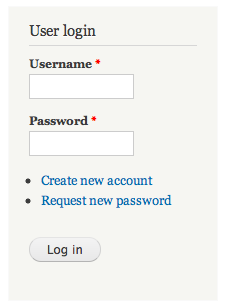
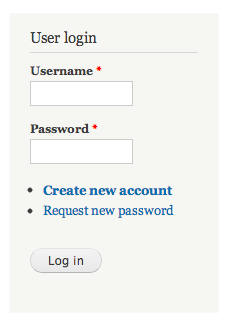
Say you want to test if a bigger registration link on the home page will increase the number of people who sign up for the site. In just 5 or 6 rapid steps on the simple Multivariate interface, you can set up an A/B test such that anonymous users hitting the home page see one of these two variations:

  The default homepage                      The modified homepage
ab_control.pngab_challenger.png

You can now get speedy reports that help you see if the enlarged "Create new account" link has been clicked on more often than the smaller one on the default page. 

Convert module

The Convert module does all the testing at convert.com. The tracking is done by your Drupal platform. If you have the budget for a pro option, convert module will give you great support with a large enterprise infrastructure.

Salient functions and features:

No coding knowledge required for A/B testing
Seamless integration with Google Analytics - can test large groups of dynamic pages
Live stats and unlimited tests on each account
One snippet of code for the entire site is sufficient, no need for repeated tagging
Stoppage of variations that hurt your conversion with reports and warnings

Tweaks to these modules can be made by your Drupal expert. Additionally, all these modules would serve as useful baselines should you require the creation of a new module for your specific testing needs.

Reference: https://www.drupal.org/node/2087977

Valuebound is a leading Drupal development company providing enterprise Drupal web solutions. To help you with landing page optimization for your upcoming project, contact us.

Marketing Automation - What does it consist of?

Why Marketing Automation

Marketing automation software streamlines, automates and quantifies the output of marketing tasks and workflows. It lessens chaos, reduces the need for human interaction and gives sales and marketing departments metrics that help prove the impact of their efforts on revenue.

What it consists of:

Marketing programs 

Once emails are set up before the associated campaign or event, marketing automation software ensures emails are sent out throughout the campaign without human intervention. Likewise, the associated social media messages, SMS and recorded phone calls are also sent out as scheduled by the software itself.

Landing Pages 

All online marketing programs must be linked to landing pages. Marketing automation ensures that the customer activity is tracked at the landing page. Information captured about the customer through web forms is directed to a mailing list, to be used for future campaigns. Landing page forms also facilitate demographic profiling of your lead, helping you to target relevant marketing campaigns to him or her.

Lead Generation 

Lead generation is the output of any activity such as email and social campaigns, online advertising etc that causes a person to be interested in your product or service. Once effective content is created for the activity, marketing automation ensures that the content reaches a large target audience as you’ve scheduled.

Lead Scoring 

Through marketing automation, the demographic information you capture online about the lead is scored according to how much the lead fits your target profile. Similarly, each online user activity on your website/landing page and other contact points is allocated a score depending on how much a part of the buying process it is. Informed prediction of consumer buying activity based on such lead scoring can help in targeting the leads with the right automated marketing activity for their level of interest and buying capacity, thus maximizing revenue.

Lead Management 

Based on lead scores, marketing automation sends the selected nurturing and marketing efforts (emails, SMSs, recorded voice calls etc) to the relevant set of leads. This ensures that the nurturing and marketing is differentiated based on how likely or how ready the lead is to buy. Marketing automation also adds the leads to the customer database once they buy something.

Leveraging and Retention of Customer Base 

Existing customers, too need to be sent messages that show you value them. Up-selling or cross-selling to is an efficacious way of ensuring high returns. Marketing automation sends the scheduled messages in chosen forms to your customers as part of facilitating further sales.

CRM Integration 

Once your marketing automation software helps generate customers, it’s the turn of your customer relationship management or CRM software to organize, track, and manage all of your customer information, activities, and conversations and to provide your sales, marketing and customer service teams with customer information. You use the information sent by your CRM to your marketing automation software which then sends out messages to customer segments to result in retention and further sales. Data relating to these efforts is in turn fed to your CRM. This interdependence is why your marketing automation software needs to integrate with your CRM software.

Marketing Analytics 

Marketing automation software has inbuilt capabilities of marketing analytics to allow you to monitor campaigns and their outcomes. This allows you to quantify the success of your effort as well as to choose which efforts are really paying dividends.

CMS Integration

Every single marketing effort needs large-scale content creation and management. And all of this needs collaborative efforts facilitated by a powerful CMS. The marketing automation you choose should necessarily integrate with an effective CMS.

To learn how Valuebound can help you with adopting marketing automation, contact us. We are a leading Drupal development company providing enterprise Drupal web solutions. 

Vimeo Video Uploader: Integrating Vimeo API’s with Drupal made easier

Valuebound proudly announces the release of a module that integrates Vimeo API’s with a Drupal website. Now you can upload/share videos from a Drupal website to Vimeo using Vimeo Video Uploader. This module serves as an efficient media management solution for multimedia assets like videos.

Vimeo is a popular video sharing website that serves as a platform to store and showcase videos by professional as well as amateur film-makers. This website also doubles as a social networking platform that lets you upload original videos, clips of popular television shows and commercials. The uploads are accepted in a multitude of formats including ASF, MOV, WMV, MP4, MPEG, 3GP, 3ivX and 3VX. A free Vimeo account lets you upload about 500 MB of video files per week while there is a 5GB limit on Vimeo Plus accounts.

Requirements

The Vimeo Video Uploader has a single dependency in Video Embed Field. Another requirement that needs to be taken care of before installing this module is the creation of an App. on Vimeo . You need to get the App. authenticated by Vimeo to acquire the account details that will be required during the configuration of this module :

# Vimeo User ID
# Client ID
# Client Secret
# Access token
# Access token secret

Installation & Configuration

Step I

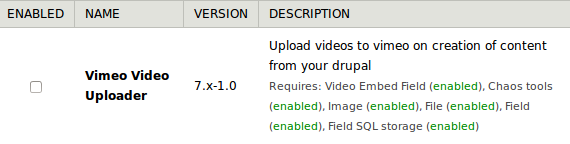
The Vimeo Video Uploader can be installed manually by unpacking this module on your Drupal website by placing it in /sites/all/modules. This module can be enabled at admin/modules.

Enabling Vimeo video uploader Drupal module

Step II

The Library api of Vimeo can be downloaded from https://github.com/vimeo/vimeo.php. Next you need to create a folder called "vimeo-lib-api" to place the downloaded vimeo.php file in it.

Step III

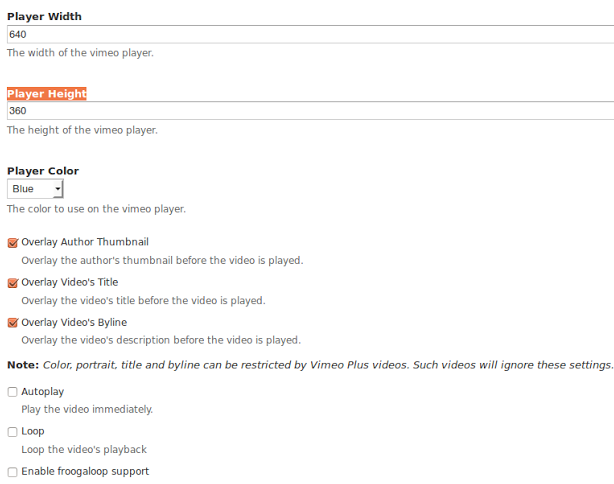
Next comes the Configuration part wherein you will have to navigate to the Configuration Page via admin/config/media/vimeo_video_uploader.

Vimeo video uploader module Drupal configuration

You will need to update the authenticated Vimeo App. details on the configuration page while selecting the content type from which the video needs to be uploaded to Vimeo.

To finally upload the video you will need to save the changes made on the configuration page. You can download the module here

Valuebound is a regular contributor of code to the Drupal Community. We at Valuebound understand your unique business needs and cater to them with our enterprise level web solutions. For more information on our service offerings or customize this module, please Contact Us.

Looking for Marketing Executives @ Valuebound Interactive Solutions

Valuebound is a boutique Drupal development services company offering expert consulting, development, training and support. We have successfully delivered many advanced Drupal projects across the globe and across verticals. Our expertise in Drupal development of web platforms is unparalleled.

We are on the look out for highly energetic and qualified IT Marketing Executives to join our team at Bangalore. The job profile would include identifying potential markets as well as pitching to clients. Freshers with exceptional communication and presentation skills are welcome to join us as Trainee Marketing Executives.

You would also need to work closely with our engineering team to communicate client requirements. You would also identify and help implement marketing strategies that need to be part of our offerings to effectively meet client requirements.

Roles & Responsibilities:
Handling business development for our Drupal services, solutions and training
Developing Marketing/Sales Strategies
Keeping a tab on the Client Network
Cold calling and generating leads
Researching and analyzing industries in order to identify new business opportunities

Skill Required:
Rapid learner who thrives in a fast-paced and demanding environment
Excellent quantitative/analytic skills, ability to multi-task, and attention to detail
Strong written, oral, and interpersonal communication skills

Requirements:
Travelling is required.
You should preferably have your own vehicle.

Please send your resume to careers@valuebound.com. You can also call us at +91 808 804 8711.

How to add site name in body classes in Drupal 7

Recently, we worked on a multi-site Drupal 7 project where we required a certain site specific CSS. In our project, all sites were using one common theme, though each of them had unique configuration and content.

Googling for a solution showed up a few methods, but none of them worked exactly as we needed. For instance, the Adaptive theme module has settings to add site-name-hidden class if Site Name display is not selected on theme settings page. However, we did not want the site name hidden; we wanted it to be shown.

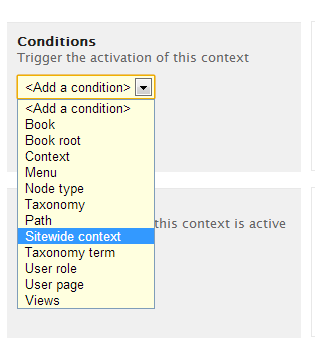
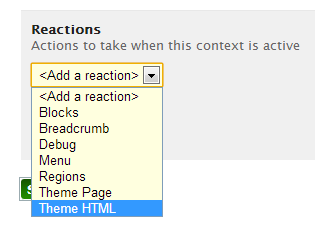
Finally we were able to by using context module. And these are the screenshots showing how you, too, can do it:

Step 1: Add new context

Step 2: Add new condition
Select Context Condition - Sitewide context

Step 3: Add Reaction
Select Context Reaction - Theme HTML

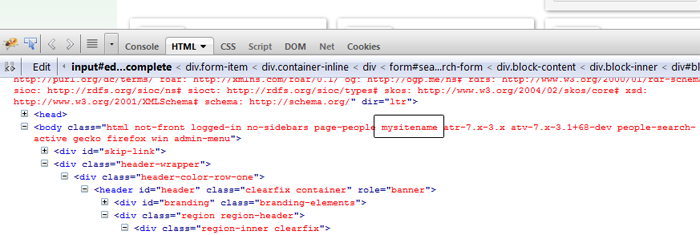
You are done. After saving you should be able to see your sitename in bodyclass.
Sitename in Body Class
 

Valuebound is a leading Drupal development company providing enterprise Drupal web solutions. For more information on Drupal development, contact us

Download the Drupal Guide
Enter your email address to receive the guide.
get in touch