Managing Drupal 8 applications remotely using Drush aliases

Have you ever thought that your business needs to make sure that your web application has a quick release in order to sustain the long race. This sort of has become easy to manage by continuous development & continuous integration using Drush & Drush Aliases. Drupal web development is one such place where multiple command-line interface (CLI) tools are available to make developer’s life easy, and among them, the two important things are Drush and Drupal Console.

In this blog, we will take a brief look at Drush & Drush Aliases and how it can make developer’s tedious manual web development tasks easy by offering various commands to replace the manual steps. You may also like to check out our previous blog where we have discussed how to write the custom Drush Commands in Drupal 8.

First thing first, what is Drush?

Drush is a Command Line Shell Interface, which provides its own dictionary of commands to interact with Drupal modules/ themes/ profiles. For instance, If you want to enable the Drupal project (modules) on your website then all you need to do is execute the following command in your CLI.

Drush command

How to install Drush in Drupal 8?

The easiest way to install Drush on Drupal 8 instance is by using Composer. Just hit the below-mentioned command in your CLI and you are done with installation. Learn more about installing Drupal with drush on our previous blog.

composer command


What are Drush Aliases?

An ‘Alias’, in general, is nothing but a small representation/acronym for something bigger. In case of Drush, the ‘Aliases’ are a short form of Drush Commands. Quite often when we have to ssh on our remote servers to perform different operations, the process becomes a tedious task and even more tedious when we have multiple instances. This is where Drush Aliases comes to our rescue.

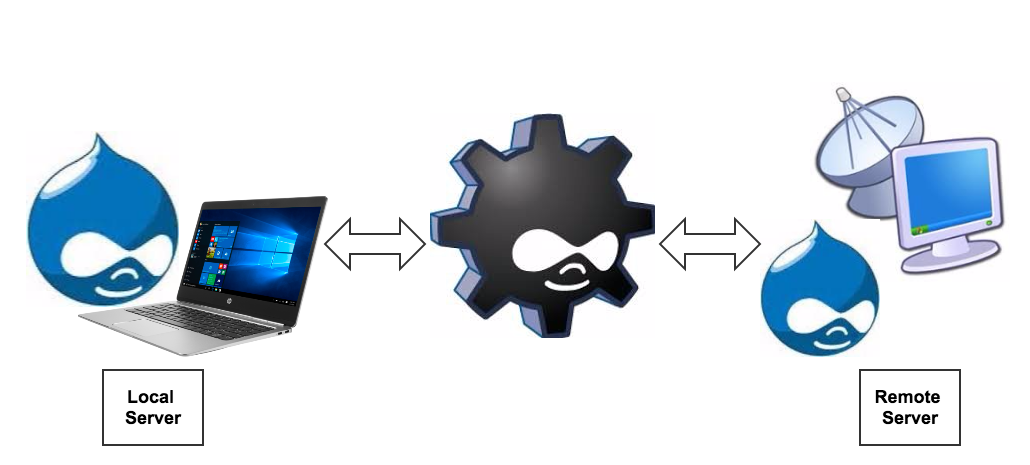
Drush

Here you have three instances “Dev > Stage > Production”, remember, all the three instances can be configured by Aliases so that Drush can perform its tasks on the remote server(s) from your local server.

Some of the common tasks can be ‘Database Sync’, ‘Files Sync’, ‘Cache Clearance’, ‘Module Operations’, ‘importing and exporting the configuration’ e.t.c.

How to set up local Aliases?

  1. Create an alias file in .drush folder of your home directory(~/.drush) to make Drush aliases (short commands) accessible from anywhere. Drush alias file must be named similar to the below convention.                                           

sitename command


Make sure your newly created alias file contains below snippet.

Similarly, you can create alias file for remote servers as well.

      2. The following snippet, when placed in your alias file, will automatically create aliases for all of your projects.

Note:  You can add $local_sites path and /docroot as per your local configuration.

If you are using Acquia and Pantheon as a remote server, you can follow the below-mentioned steps to set up the aliases on your local machine.

Acquia and Drush Aliases

  1. Sign in to the Acquia Cloud interface using your credentials.
  2. Click your name in the upper left corner and then click Edit profile.
  3. On the Profile page, click Credentials and then enter your Acquia password.
  4. Under Drush integration, click Download Drush aliases
  5. Extract the downloaded archive file into $HOME:  
  6. tar -C $HOME -xf $HOME/Downloads/mysite.tar.gz or you can place mysite.aliases.drushrc.php file into .drush folder manually.
  7. Now go to your terminal and run drush sa command to check aliases.

Pantheon and Drush Aliases

  1. Sign in to Pantheon dashboard using your account details.
  2. On the home page you will find Drush Aliases, click on it to download the file.
  3. Now you can place that file inside .drush folder.

Drush commands - A fast and easy-to-use command reference for Drush users.

  • $ drush @staging updatedb - This command is used to run pending updates on staging site.

  • $ drush rsync @staging:%files/ @live:%files - You can use this command to Synchronize staging files to production.

  • $ drush sql-sync --structure-tables-key=custom @live @local - This command is used to Synchronize database from production to local, excluding the cache table.

  • $ drush cex @dev, $ drush cim @live - This command is used to export and import the configuration.

Since we did not cover all Drush Commands and their usage, it will be helpful for you if you can check out Drush.org and Drush Commands.

Okay so now you know what is Drush and Drush Aliases and how it makes life easier for both Drupal developers and site administrators. We recommend you to try out Drush Commands to find out what works well for your current project or requirements. But there are many more advanced commands that are really worth learning.

If you have any suggestions or queries please comment down let me try to answer.

Happy Drushing!

How to create custom token to be used in default mail message template in Drupal 8

Sometimes we need to do similar coding in different places, such as for account settings email templates (Welcome email template, Forget password email template, from UI to get the same results. In this scenario, it's always suggested to create a custom token and use that in different types of email templates (account setting email templates) from Drupal UI in [token:type] format.

In our previous blog, we explored about creating custom tokens in Drupal 7 and in this, we will take a brief look at what is token? How to create it in Drupal 8?

In the vein of first thing first, what is token?

Tokens are very small bits of data or text that we use or place into larger documents via simple placeholders, like [type:token], to create custom tokens. The Token module provides an API that is used to provide tokens for all other core or contributed module in a bunch and provide browsing facility for all available tokens in UI.

When we install Drupal in our system, some Drupal core modules has available tokens that we can use in our code as well as in account setting email templates. But as a beginner in Drupal 8, It's really difficult to find out which core tokens are available and to find this, we use Token module. 

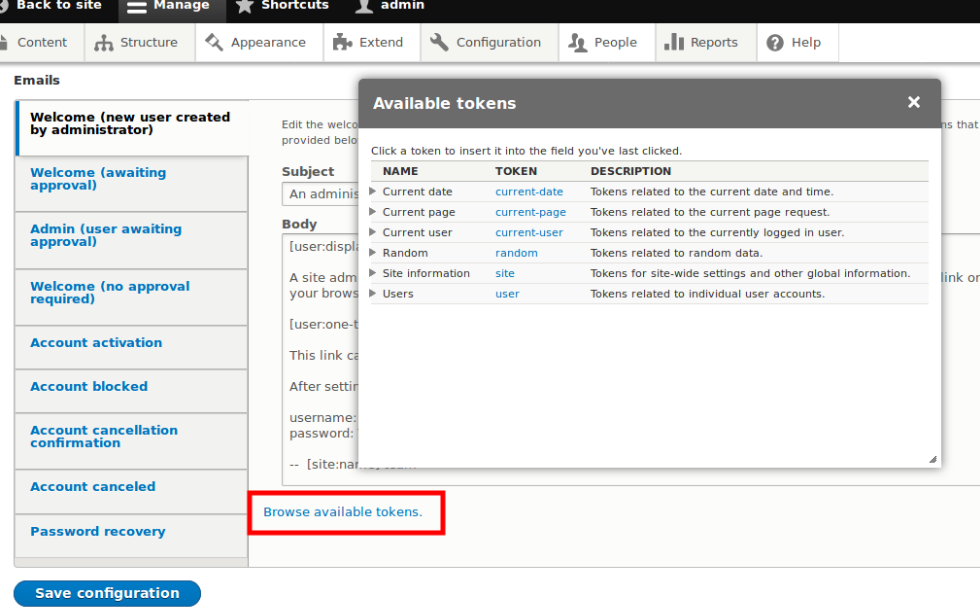
See the screenshot below for an example of available tokens.

Available token

Requirements

Sometimes, we need to create custom tokens as per the project's requirement and for that, we need two hooks, namely

1. hook_token_into()
2. hook_tokens()

hook_token_into(): This hook will allow you to provide the information of types of tokens and placeholders of tokens.
hook_tokens(): This hook provides replacement values of tokens. Some parameters are needed for this hook. Click here to check the parameters.

Here, I am creating a simple token to print “Hello World!” text as token replacement parameter.

Here we are going to see how to create a simple custom token in Drupal 8.

Step 1: Create a custom module for this custom token. Here I am creating a custom module name custom_module that contains the below-mentioned files.

custom_token.info.yml
custom_token.module
custom_token.tokens.inc

Step 2: Create a custom_token.info.yml file

Step 3: Create “custom_token.module file”.

Step 4: Create “custom_token.tokens.inc” file. Here, I have added all the custom codes for custom token.

Note: You can put both hooks and require bubble metadata class in “custom_token.module” file directly without creating any .inc file.

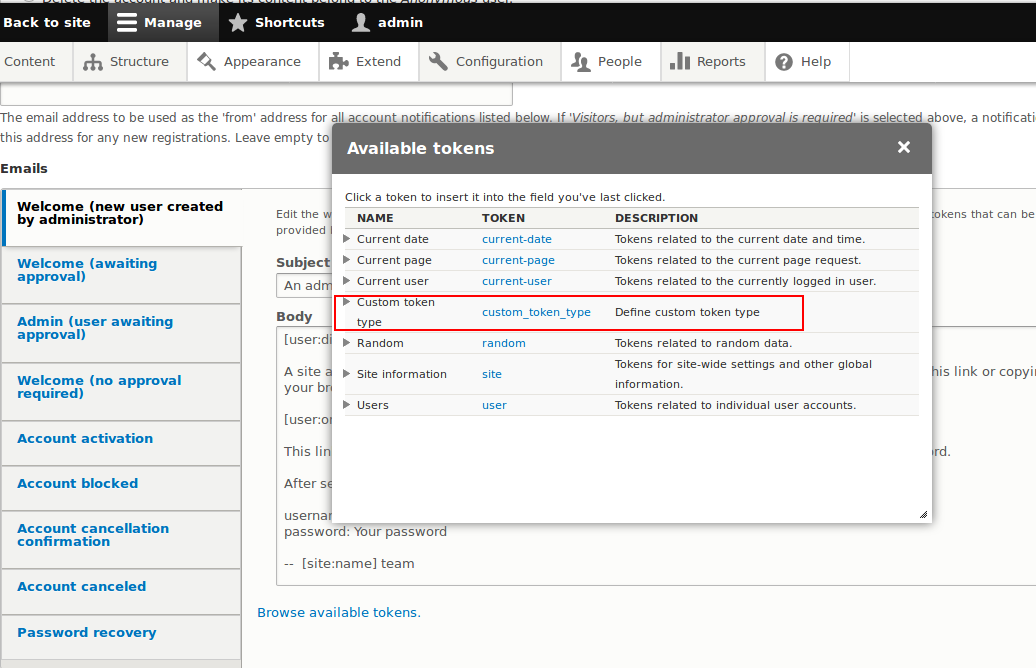
Ones you create and install this module, you will find the newly created custom token is displaying into the Browse available tokens section.

Custom token in browser list

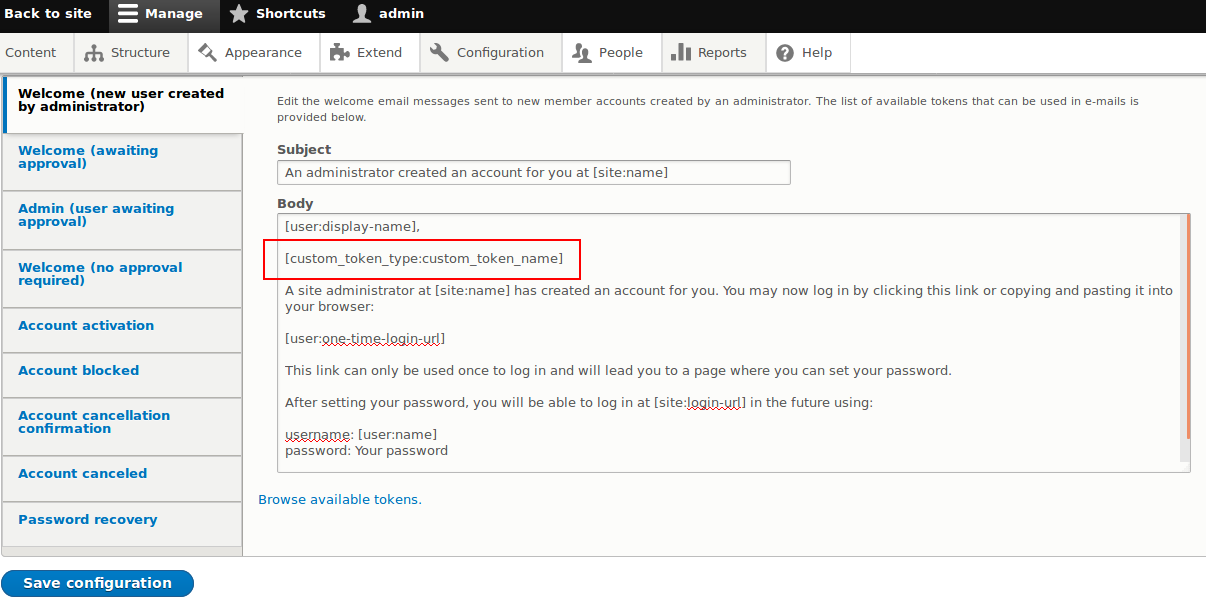
Now you can use this newly created custom token in Account setting Email section as the below format:

    [custom_token_type:custom_token_name]

See the screenshot below for an example

Custom token apply in template

Okay, so now you know what is custom Token and how to create it? You're also convinced that you've got something new to say about your subject. Go ahead! Try custom Token on your website and see what it can do for you. I invite you to comment below or ask any questions you may have. 

Below given is a presentation on creating custom tokens in Drupal 8.


My first experience of Drupal Training at Valuebound

Learning Drupal has never been this interesting!

Recently, I attended my first Drupal training session at Valuebound on this Drupal Global Training Day. Surprise to know that the session was free and you missed it!

Don’t worry! Drupal community believes in contributing towards the society by sharing the knowledge and conducting free training sessions across the world. Global Training days is one of those initiatives where experience developers from companies and local groups introduce newcomers to the Drupal community.

The introductory session by Nishant Kumar and Chirag Shah was very informative as it provided an overview of Drupal, its feature and future, growing market demand, current job scenario and most importantly, prominent brands using the CMS, such as UNFPA, Magento, Tesla, Yahoo.

Coming from a non-technical background, I found the sessions very useful as it helped me in learning Drupal’s Front and back-end development tools as well as to build my personal Drupal website. Just to let you know, there's a common misconception surrounding CMS that you can create and customize your website only if you have mounds of coding knowledge. But it is not. 

Drupal 8's accessibility support, content authoring, admin experience, configuration management, translation support, responsive themes and key core modules like views and ckeditor are some of the major advantages to give a hard blow to competitors like WordPress. 

In the later phase of the session, the team discussed on back-end development, which was particularly aimed at Drupal Developers with an intermediate-level knowledge of PHP and SQL. 

Topics covered 

The more advanced, developer-level classes were divided topic wise. Let’s check out the list of session covered. Don’t worry I won’t let you stuck in between and share links to important blogs that will help you in creating your own live Drupal website. 

Drupal 8 Folder structure: Well, the session started with a brief look at Drupal 8 Folder structure to have a better understanding of the protocols and what is where.

Installing Drupal 8: You can install Drupal 8 on your local machine as well as in Acquia free cloud. And if you are planning to speed up administrative and development tasks for your site then I will suggest you install Drupal with Drush command. By installing Drush, we can perform the useful actions simply by typing a command into a terminal for the actions that usually take multiple steps in a web browser.

Drupal overview and site-building: This session was particularly intended for all skill levels - best for those who have completed the Introduction to Drupal 8 course.

Configuration management is turning out to be an effective replacement for Features module as it helps in creating and modifying configuration entities easily. In this session, the mentors discussed what we can do through configuration like site building, content types, taxonomies etc. Further, Configuration management has been integrated into the Drupal 8 Core to let you make and verify site configuration changes in the development, staging and production environments. 

Contributed themes: Theming in Drupal has undergone a lot of changes since Drupal 7 and now Drupal 8 has become the most leading Drupal ever build and adding more feature compared to other CMS which are out there. For instance, Introduction of twig in theming part.

Views: The most installed module - Drupal Views - is now available as the core module. And you don’t have to search for the latest version separately. For the 1st timer, Views allows you to generate a dynamic query using easy to use UI.

Remaining sessions were on Drupal 8 module development, setting up local dev box for Drupal 8 website on Apache server and configuring Apache Solr 6.6.1 with Drupal applications to achieve fast product/content search for enterprise web applications and others.

When I completed the session, I was surprised at how much we can do with Drupal. My experience at Drupal training session gave me a moderate-level understanding of the platform. How about you? Did you attend the session this year, if not, then probably you missed something. But don’t worry! Valuebound and other Drupal companies conduct similar session every year and you can attend it next time.

Please share your experiences by commenting below.
 

Secure users private data from unauthorised access using SSL

As a member of development team, I used to develop web applications using Drupal CMS without worrying about HTTP or HTTPS as it has to be added by dev operational team in my organization. On the serious note “How the Secure Sockets Layer (SSL) prepended to the existing URL” and How does it make a huge difference? Why it is important to make your web URL prepend https instead of HTTP.

Today SSL has become an eye-glazing topic and people want to know more about it so that they can protect their data from unauthorized access. In this blog post, we will take a brief look at basics of SSL and discuss how to secure the website running on Apache with HTTPS. Don’t worry! It's not a rocket science and very simple to secure your site as well as private data. In between, we will also explore some examples of secured and unsecured websites. You may also like to check out how to install & configure Apache on Windows machine.

Note: HTTP is not an encrypted server, hence, prone to cyber attacks and malware. 

Scenario

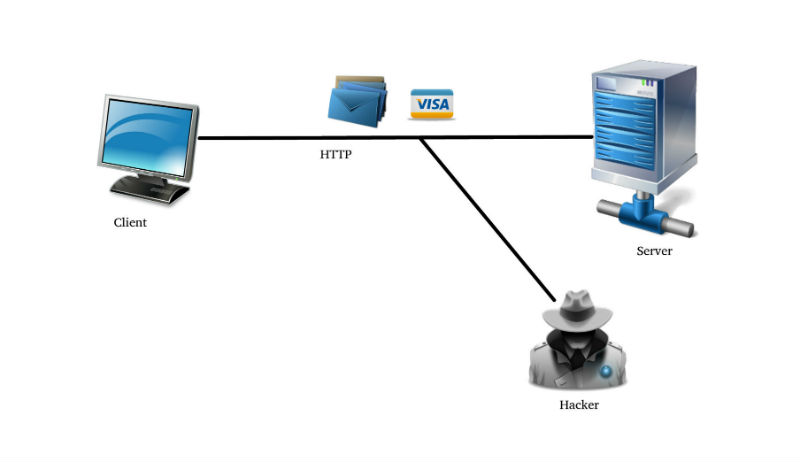
What happens when we connect to any website by entering the URL, it looks for specific IP address and then connect you to that server. Ones you start making a frequent request for each and every event from the HTTP server, the data sent from your server becomes prone to attack as it is in clear text format. 

And during this process, eavesdropper gets an access to read the conversation and attempt to create severe problems by using personal credentials, bank details, and other sensitive data. This is one of the major loopholes of HTTP. In contrast to that https protects your data from unauthorized access. Saving from all these headaches. 

See the image below for an example of an above-mentioned scenario.

HTTP

Solution:

In order to overcome the above situation, we need to transform HTTP to HTTPS in an address bar. In HTTPS, S stands for Secure Sockets Layer (SSL), which is responsible for securing communication over the internet. 

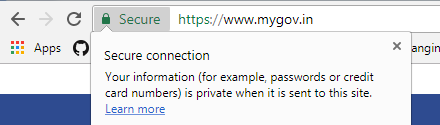
Check out the address bar of below screenshot for an example of SSL enabled site.

Address bar screenshot


HTTPS is comparatively more secure than HTTP. When we connect to a website, it automatically redirects to HTTPS and after that browser checks the certificate and verifies from the certificate authority (CA). Remember, a bad certificate issued by CA causes system failure sometimes.

When we send information over HTTPS, note, we are safe to make online transactions and share important credentials as it is encrypted. Enabling https on your site protects you from eavesdropping and any other attack.

Below figure is an example of how HTTP and HTTPS work.

HTTP vs HTTPS

On top of that if you are marketing or promoting your website among others then you should be more careful and enable SSL. Enabling SSL helps you to place your website in the special category, called secure, which pops up on the address bar when you start searching.

However, the presence of HTTPS and lock screen on address bar is not enough to say your browsing is secured. Some hackers create lock icon and replace with favicon just to showcase secure website. Keep your eyes open for these technical glitches.

Secure connection


If you don’t find HTTPS indicator on the browser, it means you may be connected to an impostor website on a compromised network. Well, these are the basics and I guess this much knowledge is enough for SSL and how somebody can perform secure browsing over SSL. 

Let’s get some local set up to perform SSL. 

What I am running on 

I have XAMPP web servers that run on Apache. 

How can we achieve

To enable SSL, we have to configure three major files.

  1. Httpd-vhosts.conf
  2. Httpd.conf
  3. httpd-ssl.conf

httpd-vhosts.conf

At this place, we create hostname by adding some of the parameters to enable SSL for the local web.

Codes mentioned below belongs to my local instance.
 

# http

DocumentRoot "C:/xampp/htdocs/api"

Options All
AllowOverride All
Require all granted

# https

DocumentRoot "C:/xampp/htdocs/api"
ServerName api
SSLEngine on
SSLCertificateFile "conf/ssl.crt/server.crt"
SSLCertificateKeyFile "conf/ssl.key/server.key"

Options All
AllowOverride All
Require all granted

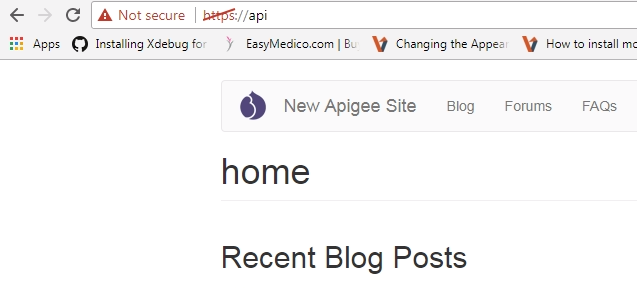
Once the SSL is enabled, your site is going to look similar to this.

SSL enabled site

Some of the important parameters that I would like to discuss here:

  • SSLEngine

To turn on secure communications using SSL, we need to add a separate block to our host file, where one would be for handling regular HTTP and another one for https. Just to let you know, SSL should be disabled by default in the main server as well as in newly configured virtual hosts.

Syntax:   SSLEngine on|off|optional
Default:  SSLEngine off

Module:  mod_ssl

Example: SSLEngine on
    

  • SSLCertificateFile

This certificate file holds X.509 Certificate public key for data encryption.

Syntax: SSLCertificateFile file-path

Module: mod_ssl

Example: SSLCertificateFile "conf/ssl.crt/server.crt"

  • SSLCertificateKeyFile

This file holds private key for the corresponding public keys, which is used in SSLCertificateFile to encrypt and decrypt the data. 

Syntax:  SSLCertificateKeyFile file-path

Module: mod_ssl

Example:  SSLCertificateKeyFile "conf/ssl.key/server.key"

  • httpd.conf 

Apache configuration file contains one directive per line. Main configuration is of server is always been pulled up from httpd.conf file. Httpd is capable of loading multiple module and configuration for your website.

Location: C:\xampp\apache\conf\httpd.conf

To enable SSL make sure SSL is enable not comment out by [#]tag.
search for 

#Secure (SSL/TLS) connections
#Include conf/extra/httpd-ssl.conf
 

  • httpd-ssl.conf

All SSL enabled from apache takes default port as 443. 
Make sure to remove the comment from DocumentRoot to allow SSL

##
## SSL Virtual Host Context
##

# General setup for the virtual host
#DocumentRoot "C:/xampp/htdocs"

Location: C:\xampp\apache\conf\extra\httpd-ssl.conf

This post is all about transforming your HTTP to HTTP(S), which is required to secure transmission & avoid eavesdropping. I have performed this on my local machine. In a similar way, you can do it on the real-time web application on the web server. To get the verified certificate, you can get in touch with web hosting distributor or third party or create your own self-signed-certificate to list your website in the generic list and Top Ranking.

Enable SSL on your website and see what it can do for you. Also, if you have any suggestions or queries please comment down and let me try to answer.

Planning to attend next Drupal Camp? Here are 6 things you should look for

Attending Drupal Camps has always excited me, reassuring faith on open source platform for building amazing digital experience. Drupal Camp Pune 2017, which was held at Symbiosis Institute of Management Studies, was such an event. Though it is bit late but worth sharing such an amazing experience.

Considered I am fairly new to this tightly-knit Drupal Community where developers and other enthusiasts are quite active in sharing their learning experiences. In July, me along with my colleagues - Puja Kumari and Suchitra Kumari from Valuebound - participated in Drupal Camp, and returned with new ideas, challenged assumptions, professional relationship, and others.

Not to mention, it was an amazing time meeting professionals, Drupal enthusiasts, college students and job seekers. The Camp received a remarkable response from more than 200 participants as expected. For the event, Valuebound - Drupal services specialist, Bangalore was one of the sponsors along with Acquia, Srijan Technologies, Innoraft Solutions, QED42, Drupalize.Me and OpenSense Labs.

Drupal Camp Pune 2017

Here are the six takeaways from Drupal Camp Pune 2017:

  • At the camp, we met a lot of enthusiasts who believe in open source platform and looking forward to work in Drupal.

  • Seeing the enthusiasm and energy of Drupal developers, many recent college grads and experienced employees enrolled for the ongoing hiring process.

  • It gave us golden opportunity to meet like-minded people and understand how leading organizations leverage the benefits of Drupal to reach their estimated goals.

  • The camp also helped me in understanding the importance of teamwork, community, and contribution towards Drupal.

  • Most importantly, it was an awesome time attending the Camp and met people having the same destination but different paths to success.

  • Notably, there were some excellent sessions. One of the sessions by featured speaker Rakesh James, who spoke on “why we need to invest in Drupal 8 and its future”, received great response from Drupal enthusiasts.

Drupalers

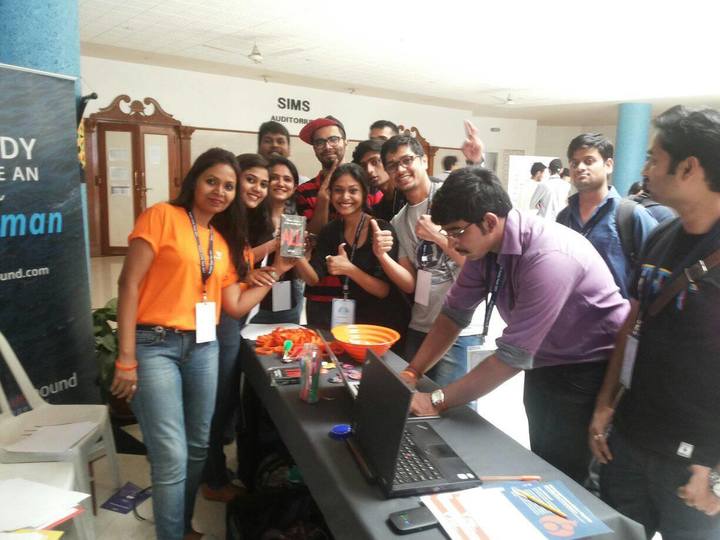
Following the session, we also hosted a range of fun-filled activities that engaged quite a lot of participants from the Camp. Many people also grabbed goodies as a souvenir.

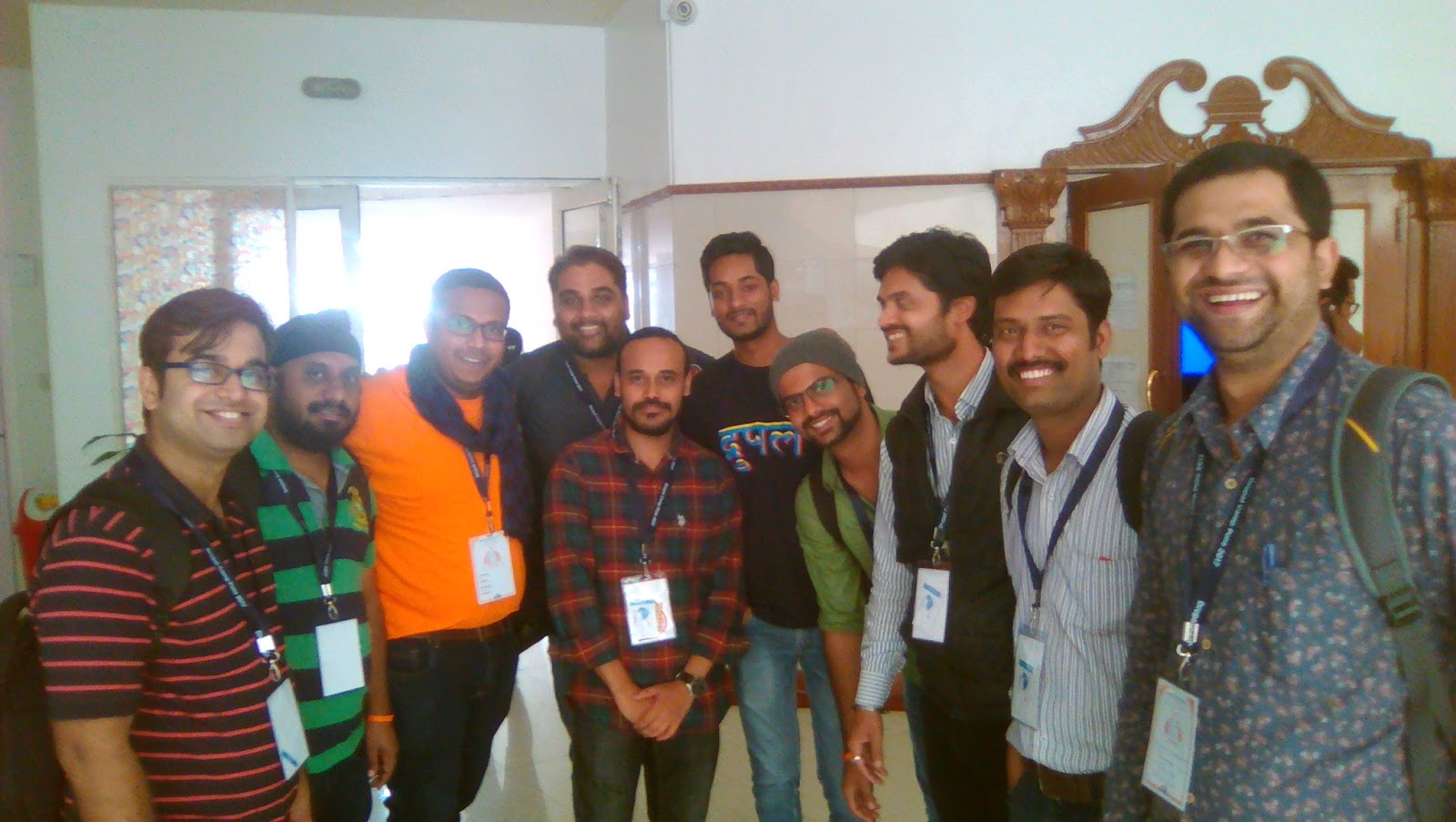
Drupal Camp Pune Participants

It was a great time to attend the event. The Drupal community is more than just drupal.org where everyone is happy to discuss problems and share ideas. Not to mention, it left a beautiful memory and inspiration for forthcoming community events. 

With this, we look forward to being hosts once again like Drupal Camp Mumbai 2017 and  Drupal Camp Bangalore 2015.

How to use Features module in Drupal 8 to bundle functionality in reusable module

Features Module has played a significant role in deploying site configuration for Drupal 7. If you’ve ever build a site in Drupal 7, then possibly you have worked with the Features Module. However, CMI in Drupal 8 solved a lot of problems that we faced with Features in Drupal 7. In this blog, we will discuss - Why do we need Features Module in Drupal 8? What is the use of it? We will also attempt to export photo gallery feature.

Let’s take a use-case where you are working on a media and publishing company project and your client wants a feature of ‘Photo Gallery’ on his/her website. In this case, you will have to keep a track of following files:
 

  • content-type.yml
  • my-fields-storage.yml
  • view.yml
  • image-style.yml
     

So now how we will get to know that Photo Gallery feature comprises only of the above-mentioned files or still there are any more dependencies? 

Is there any way where these files are BUNDLED together? Is there any way where configuration (e.g. adding fields, image style to view) changes related to Photo Gallery feature is auto-detected?

This is where Features Module is used to bundle functionality into reusable modules. That’s main difference between CMI and Features.

Let’s see steps involved in exporting photo gallery feature in Drupal 8

Note: We are installing Feature Module using drush commands.

  • Install features module using the following drush command: 

drush en features -y

  • Create a content type My Image Gallery having an Image field.

manage fields

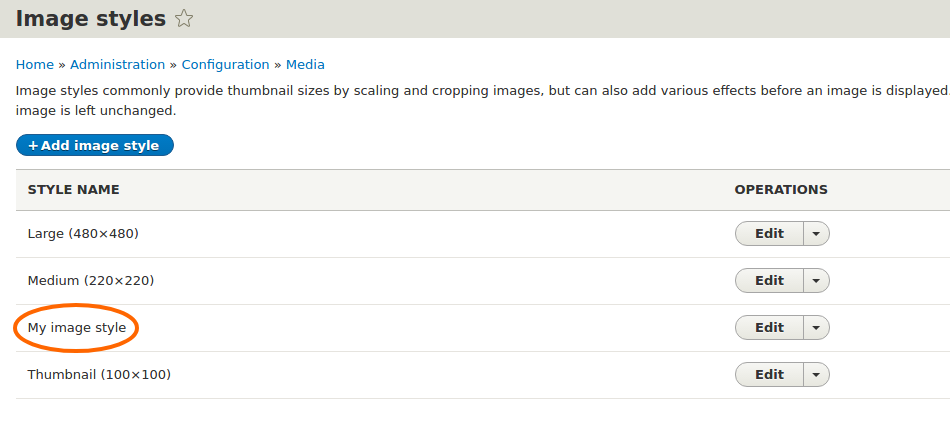
  • Create an Image Style, such as My Image Style. See the screenshot below for an example.

image style

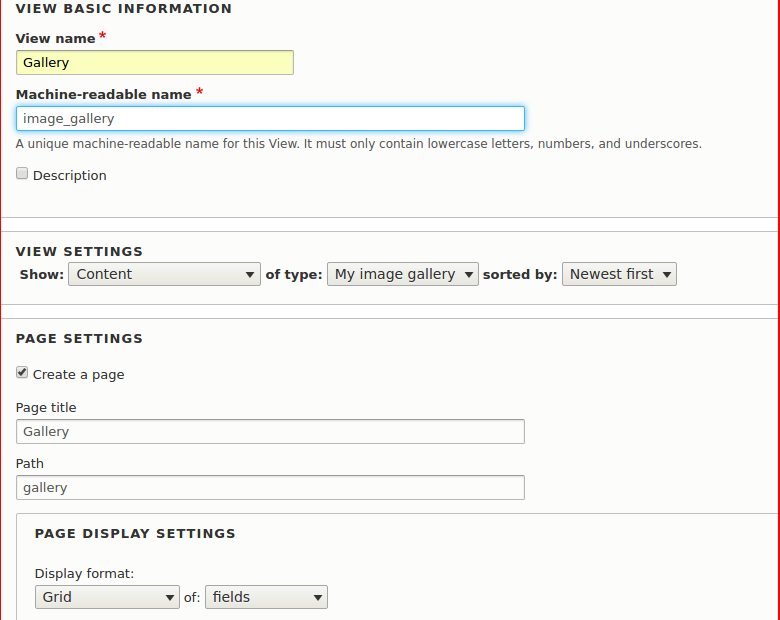
  • Now create a view of the content type ‘My Image Gallery‘ with the image field.

creating a view

  • Add Image field. Select the Format as ‘Image’ and Style as ‘My image Style’.
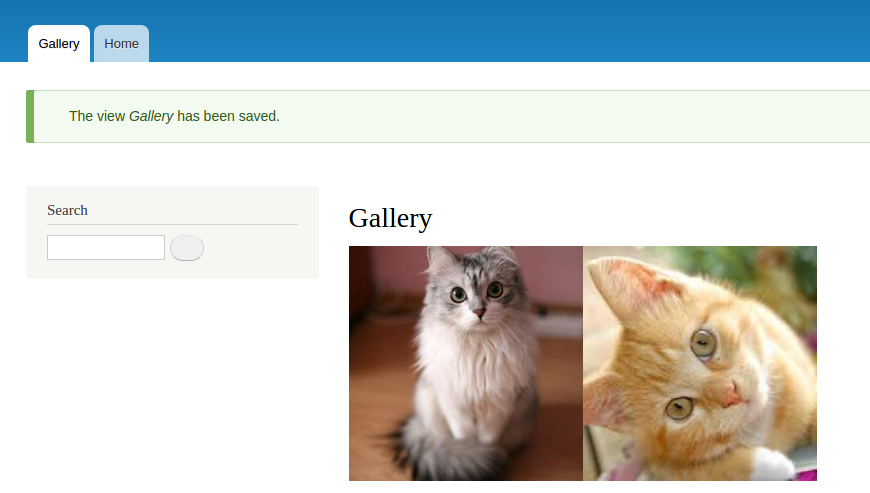
  • Add Some content and your gallery will look like:

gallery

  • Now to Export this feature, go to Config>Development>Features.
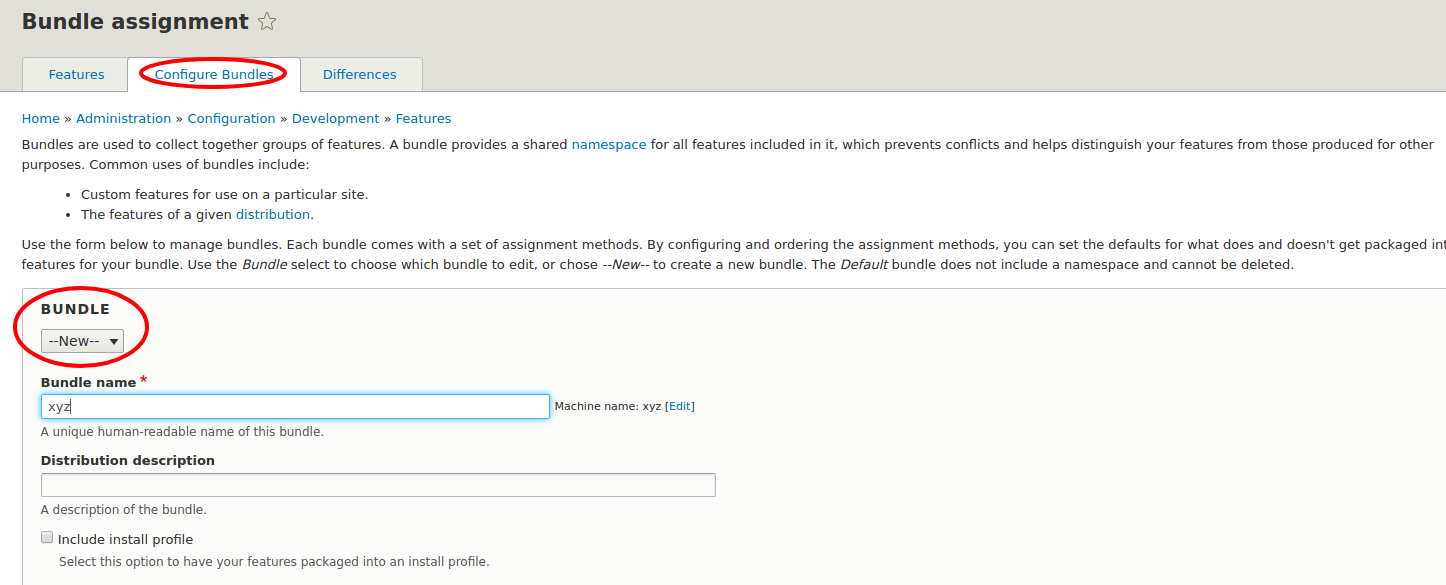
  • Create a bundle to give a common namespace to your feature.

bundle format

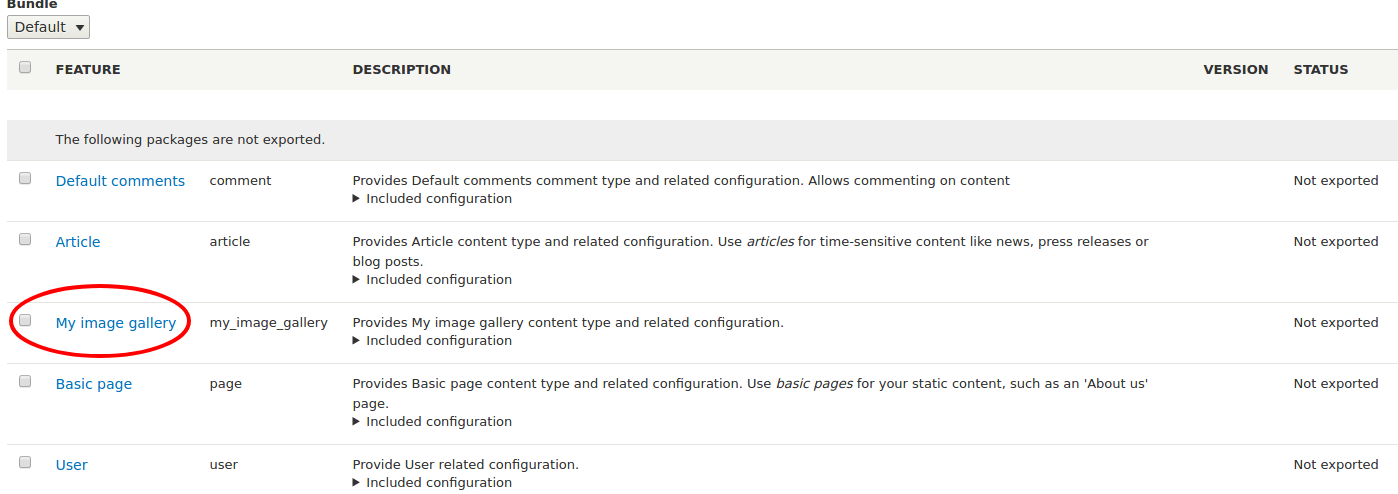
  • Ones you create a bundle, Image Gallery View will be auto detected by feature:

auto detect

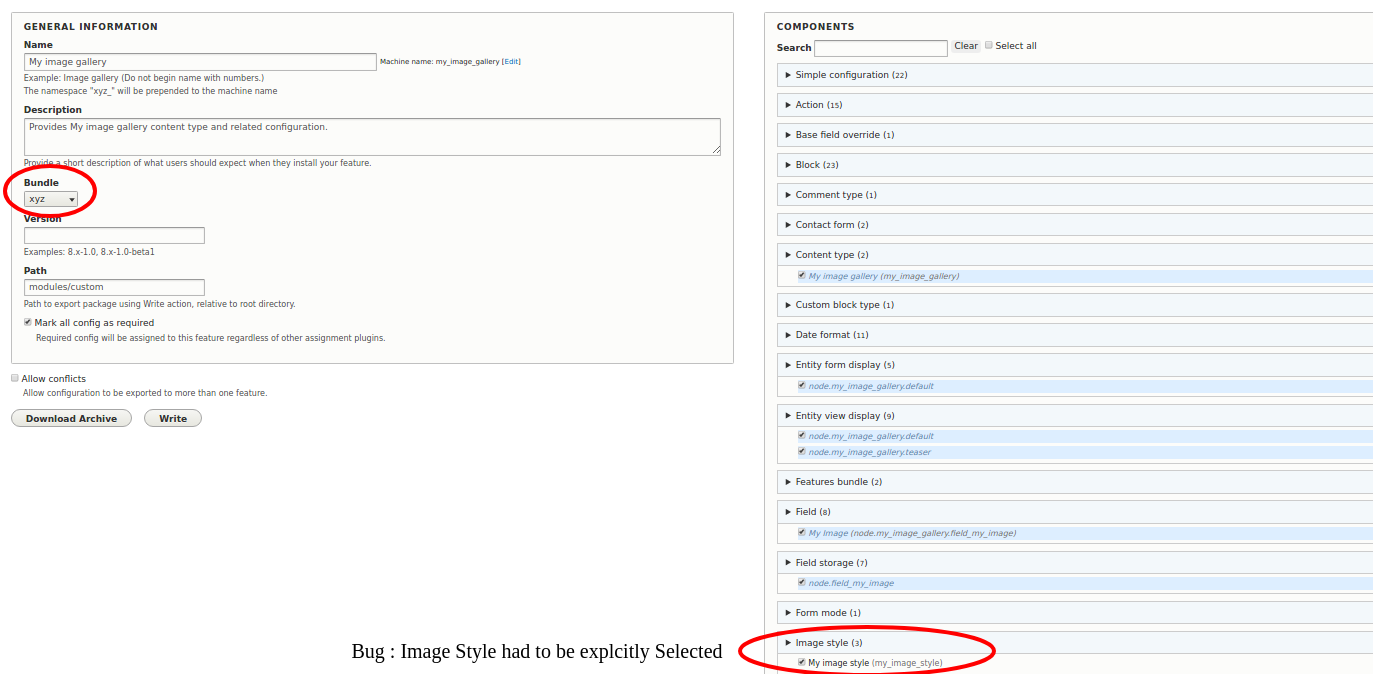
  • Now click on ‘My Image Gallery’. Add it to ‘xyz’ bundle and click on write.

feature page

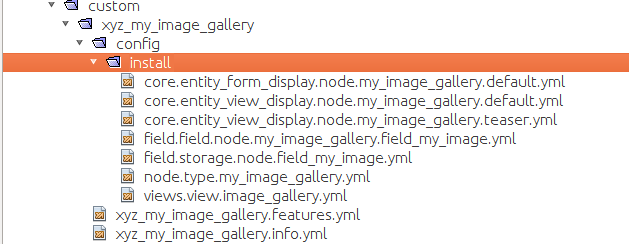
  • It will then create a module in your custom folder by the name ‘xyz_my_image_gallery’.

module structure

  • You can place the module in any other instance and enable it. The Feature will be installed with all the configurations and we don't NEED FEATURES MODULE on other instances to install and use this module.

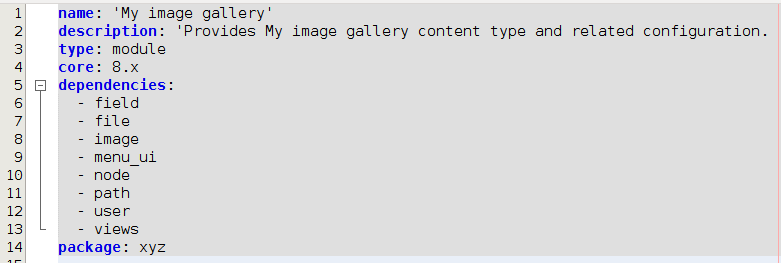
Notably, a Feature Module contains additional information in its .info.yml and .feature.yml file to check, update, or revert configuration programmatically.

.info.yml:

 info.yml

.features.yml:

feature.yml

How to decide what to use?

It depends on the use-cases. If you need to export and deploy simple site configuration then you can use Drupal 8 configuration management system instead of Features. Whereas Features in Drupal 8 can be used to export bundled functionality like a photo gallery feature, a blog or press room.

Media and Publishing companies are constantly transforming, and so is development, we, at Valuebound are one of those companies who specifically help organizations in their path to Digital Transformation. We enhance digital experience for end users, with customized web applications. 

Hope this blog will helpful for you to export features programmatically. If you have any doubts or questions, please comment below we will be happy to help you.

Below given is a presentation on Features Module.
 

Reference

https://www.drupal.org/project/features 
https://events.drupal.org/losangeles2015/sessions/features-drupal-8 
https://www.phase2technology.com/blog/announcing-features-drupal-8


Free Drupal Training Session at Valuebound, Bangalore on Global Training Day

We are excited to inform you that Valuebound, Bangalore is conducting a free “Drupal-in-a-day” training session on this Drupal Global Training Day i.e. 16th September 2017, Saturday. The session is an initiative of Drupal Association to introduce newbies to the world of open source platform.

Learn and design your own live Drupal website. The session will be presented by our Drupal 8 expert practitioners and senior Drupal consultants, having years of experience in delivering successful projects. The session will also help you in understanding how CMS can help you in your career building.

Level: Introductory

Duration: 1 Day

Proposed Session

Valuebound Drupal-in-a-day training comprises of various sessions that span over the different stages of designing a live Drupal Website. The session will also focus on teaching you the main features and concepts of Drupal with live practice sessions, terminologies associated with it and different modules. When you will complete this, you will have a moderate-level knowledge of Drupal in designing live websites and selecting modules to get the functionality you want with maximum benefit.

Ideal for...

Whether you're an established professional or new to Drupal, this training session will give you an expertise you need in building your own live website. 

If you are PHP/Web developers, then you would never like to miss this opportunity as it will help you in giving an edge to your career with an additional insight. 

Fresh Graduates can easily learn about CMS that will help them in giving a boost start to their IT career path as a developer. Drupal is widely used by Fortune 500 companies, governments, start-ups and more.

If you are a Career Switcher and planning to change your domain then it is the best time to learn what more is there for you in IT industry.

Project Managers considering Drupal projects can best utilize this training session as it will help in understanding what they should know about the CMS.

Decision Makers can best utilize of the session to evaluate Drupal for building their product on. Explore why it’s the perfect fit for your next project. 

Drupal Training session is for everyone, who is interested in knowing what Drupal is and evaluating or implementing it.

Prerequisite, but not mandate

Starting from scratch may be difficult, but a little knowledge of CMS would be an added advantage. If you have a hand on experience on WordPress, Joomla or HTML, and CSS then it would be great. Else no worries! The training is aimed at training and encouraging newcomers and polish the fresh graduates. This session will present you an outline of Drupal concepts and not an in-depth course.

So what

When you will complete the session, you: 

  • Will have your own live Drupal website.
  • Will be able to install and configure modules and themes from Drupal.org.
  • Can create content and configure content types as well as create listings of content.
  • Can easily manage user roles and accounts, as well as aliases and URL paths.
  • Can also create blocks and place them in the layout
  • Why this training session is free

We believe that the best way to contribute some thing is to share the knowledge within its community and newcomers. Valuebound is an active contributor to the Drupal Community and has achieved the top position in the country and seventh globally. This event is part of one of our efforts to give back to the community.

As a Drupal specialist, Valuebound is dedicated to help organizations and individuals to adopt the platform in their operations effectively. And we believe in giving result oriented training sessions that will help you to build the perfect websites you visualize.

Come and join us! Be part of our Global Community where learning and committing is the key to success. If you have any queries or doubts regarding the session, comment below or contact us.

Final hours: RSVP to register.

Note: Carry your own laptop to make the best use of the session

How to create custom REST method to protect your content from unauthorised use

In last few years, protecting data from an unauthorised use has become a challenging task. Recently, we came across a similar situation while working on a media and publishing industry project where most of the content was used through services. And we were requested to protect the content from unauthorised use and help in stopping such practices. 

Here in this scenario, RESTful Web Services API played a significant role in overcoming the situation. However, in some cases, the default RESTful API doesn’t work effectively and leave the requirement unfulfilled. In this case, we will create a custom REST method that helps you to access nodes using API keys. Let’s see how we can achieve this?

Here we need to deal with two things:

  • Create a View to export data with Rest API
  • Create a custom Rest method to access  nodes

I guess you would also like to take a look on our previous blogs where we have created Rest Resource for GET Method to enable other websites or applications to view, edit or update information; and Custom Rest Resources for POST methods to create an article in Drupal 8 website from an external application.

Follow the below steps to create a View to export data with Rest API followed by customizing Rest method to access nodes by using the API keys.

How to create a View to export data with Rest API?

Step 1

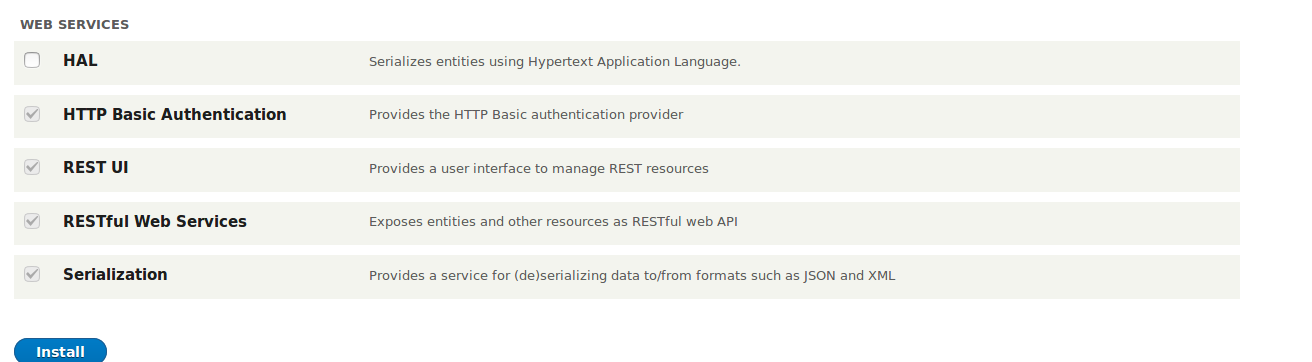
Select the RESTful Web Services module and download REST UI dependency module. See the screenshot below for an example.web services

Step 2

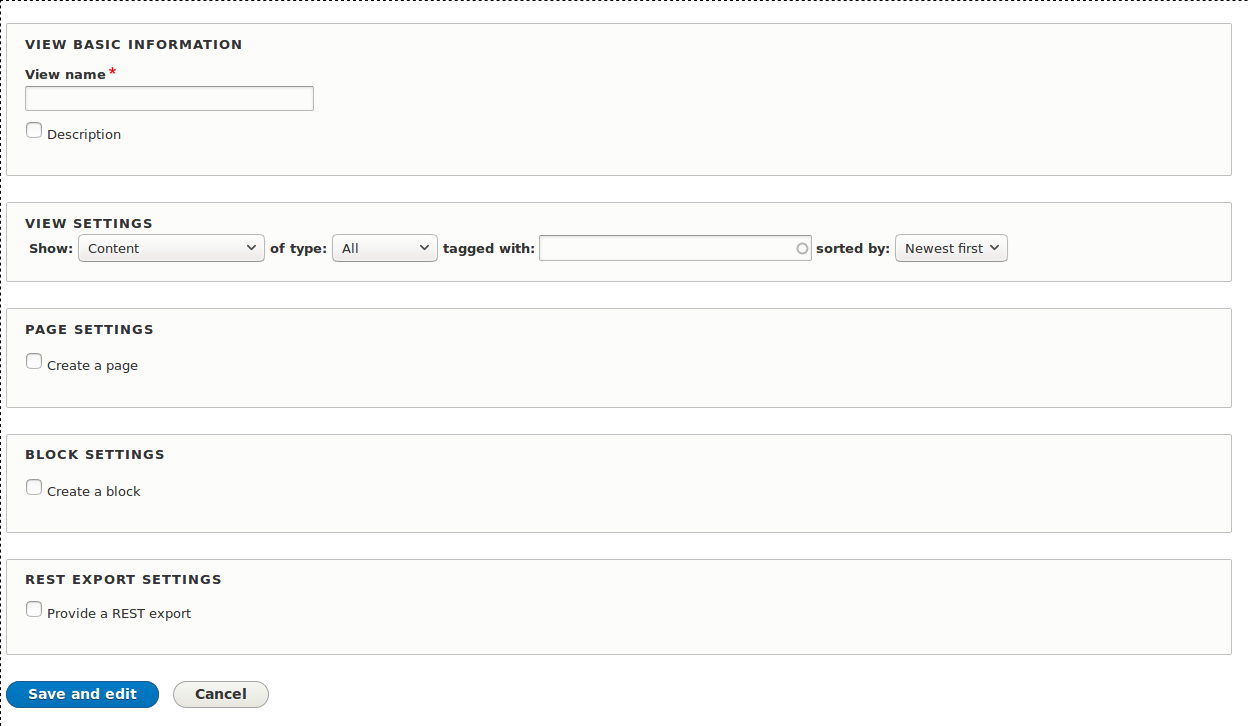
After Installing Web services, create a View to export data with Rest API following a few simple steps. Fill basic pieces of information then save and edit to create the REST pages.

Step 3

Go to admin/structure/views and click on Add View Button. Follow the below steps.

  • Create a View  named  “article view”
  • In View setting, select the Type Article
  • Select the “REST EXPORT SETTING”

create view

Step 4

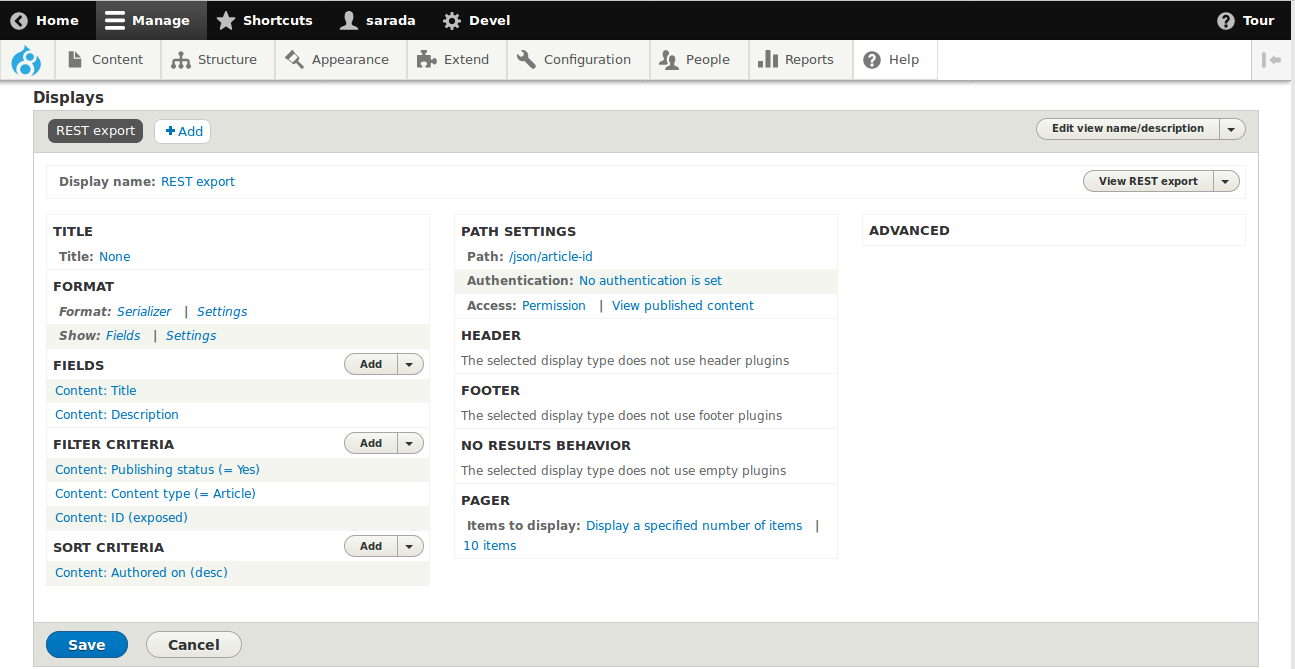
In View page, you need to

  • Select the Serializer formatter
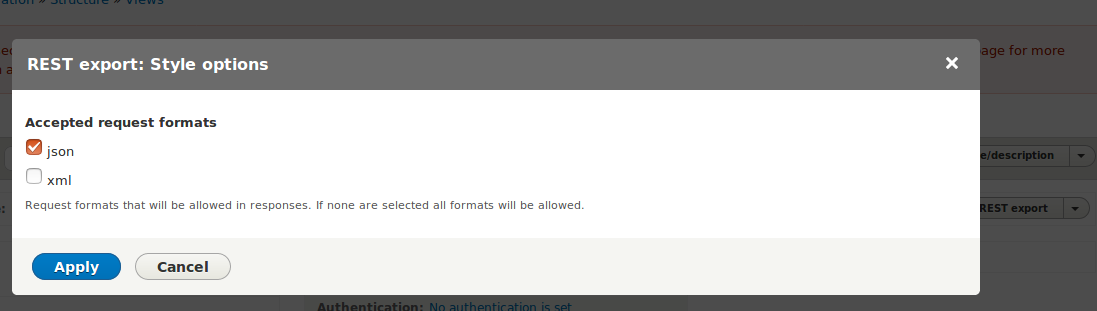
  • In Format, click on settings and select json format
  • Select Title and Description field
  • Expose the Content ID
  • In Path Setting, give path /json/article-id


View export


style options

Step 5

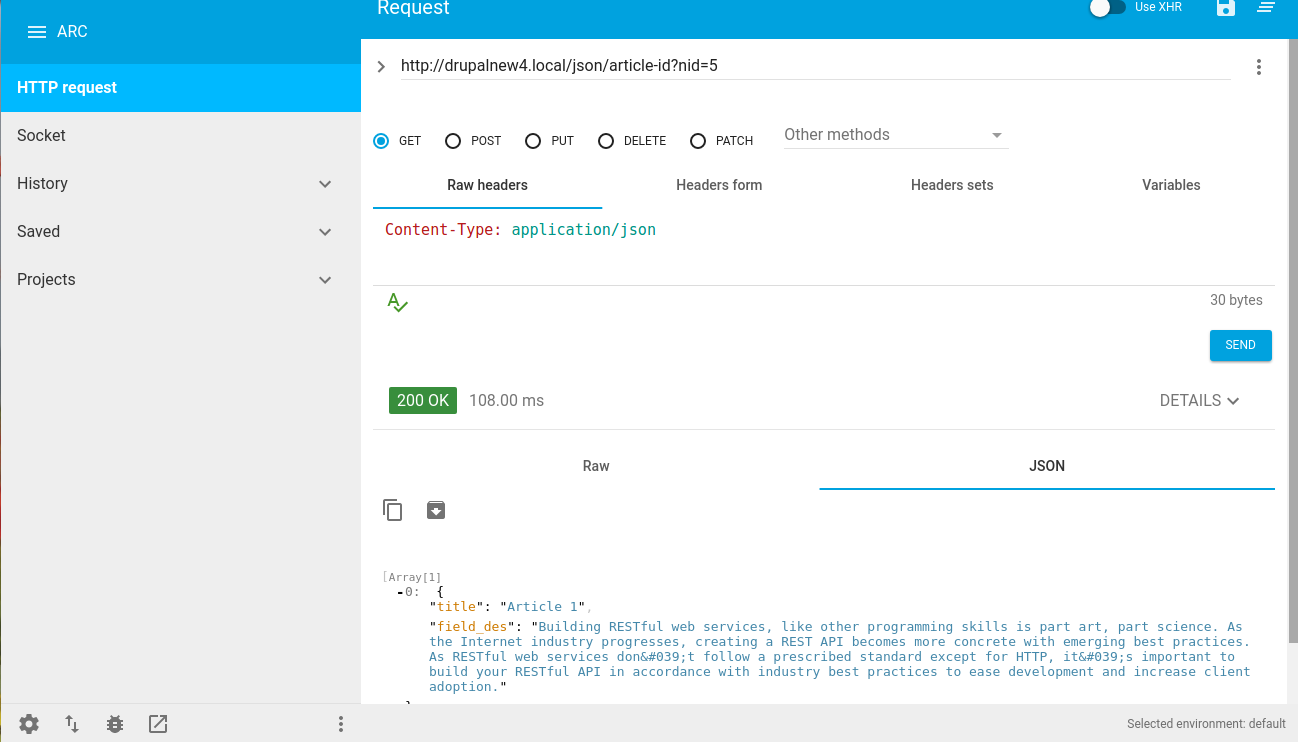
Now let’s access the article node in browser using the path given and Content ID.

Example

URL: {Basepath}/json/article-id?nid=6

Rest export

Now you can test using Rest Client by entering the Url. See the below screenshot.

Advanced rest client

How to create Custom Rest Method to Access Nodes by using the API keys?

Let’s create a Custom Rest Method to Access Nodes so we can create a custom module. We can also use Drupal Console to create a module.

The module name is “test_api”

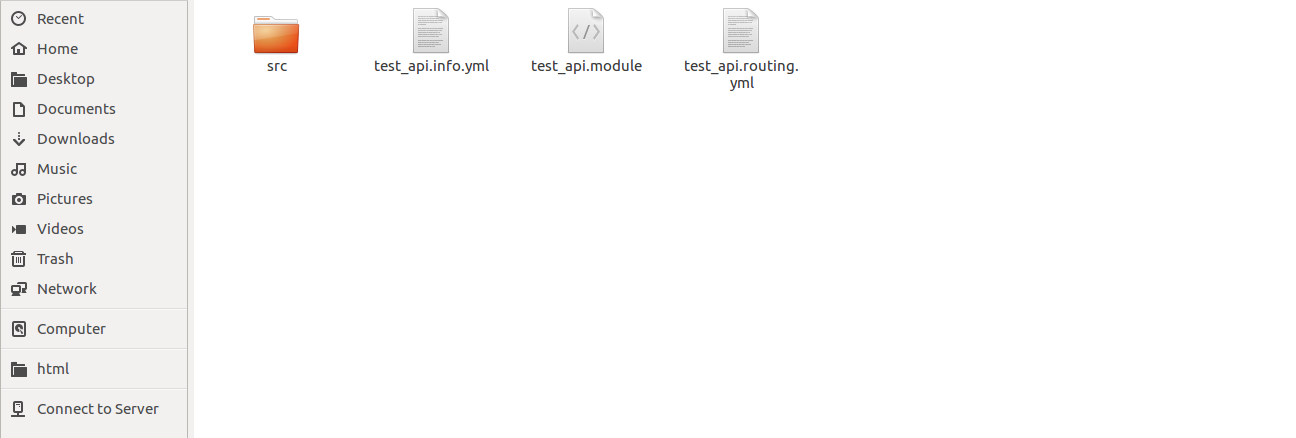
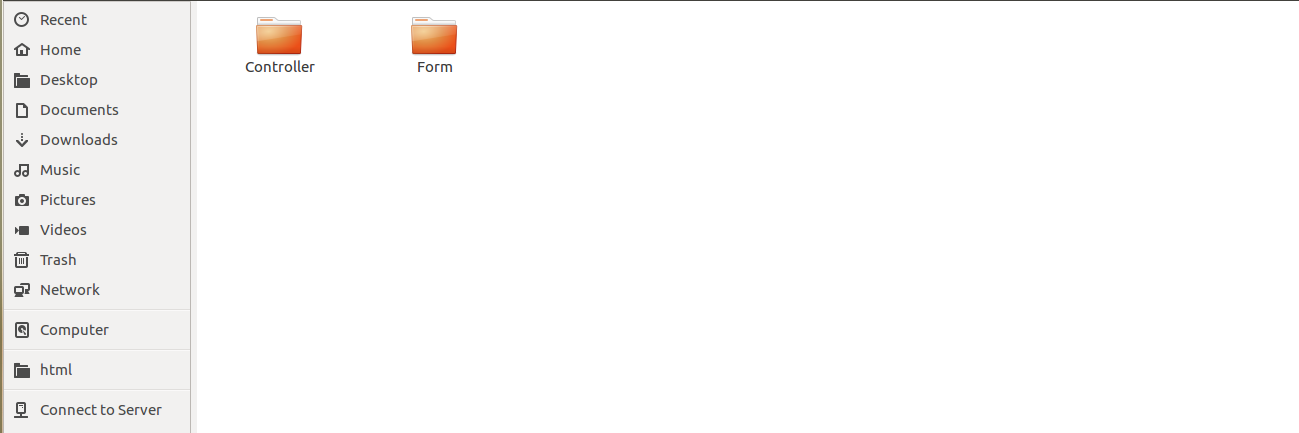
See the screenshot below for an example of the folder structure.

TestAPI


TestAPI

Step 1

Create a test_api.info.yml file and enter the following code.

name: Test API

type: module

description: Custom RESTful API module.

author: Sarada Prasad

core: 8.x

Step 2

For the below code to work, we need to create a TestAPIController.php file inside Controller folder.

Here, we are showing Get Method example.

Step 3

Follow the codes to create a routing file test_api.routing.yml file to access the methods.

Step 4

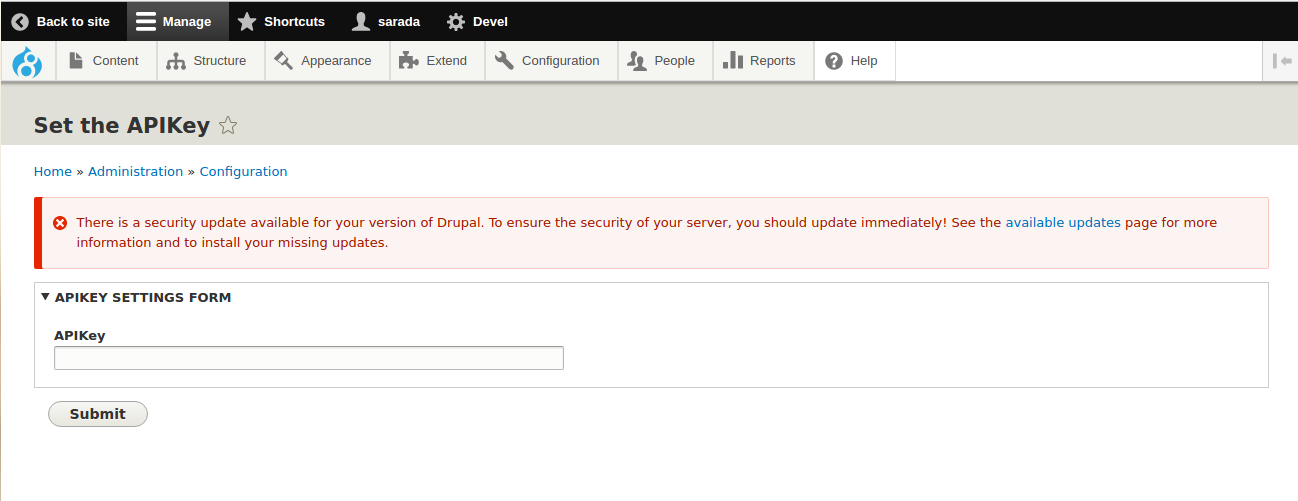
Let’s build a Form APIKeySettingsForm.php inside Form folder to create API Key to access the node.

Step 5

set the APIkey

Step 6

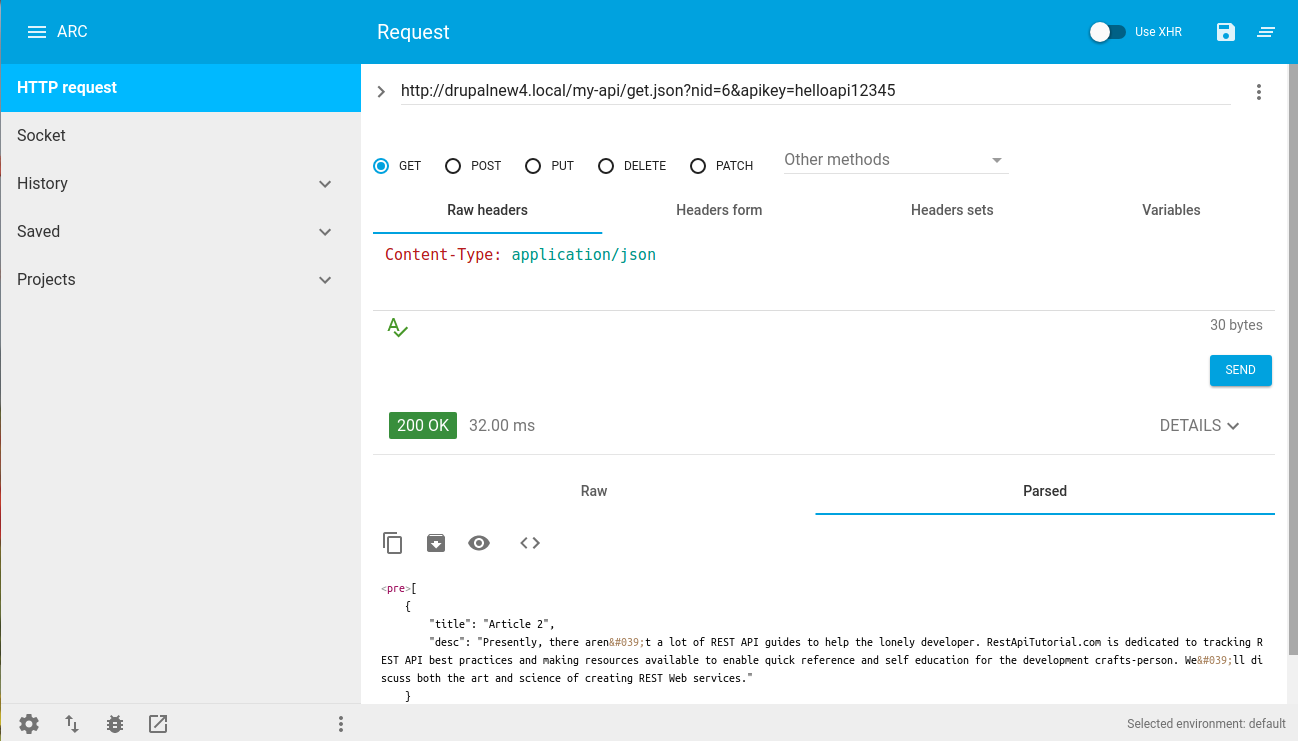
You can also access the node with the API key created and test using Rest Client.

{Basepath}/my-api/get.json?nid=5&apikey=helloapi12345

Building Restful Web services

There you have it, now you can test using Rest Client

Advanced rest client

Customizing Web services programmatically has become a routine task in order to protect the company’s data. In this post, I haven’t covered a lot of basic things and explained how to create and customize Web services. The above-explained process will also help you in securing your client’s data.

Hope this blog will be helpful for you. If I have missed something or you want to add then please comment below. Whether you are Media and Publishing firm or a Drupaler, you can discuss with us the problems you are currently facing or any other service related issue anytime. You are just a click away.

Below given is a presentation on RestFul Web Services in Drupal 8.

Setting up local dev box for Drupal 8 on Pantheon using Drush commands

Over the past couple of months, I have been facing a similar situation where many developers are unable to set up a local dev box for Drupal 8 on Pantheon server. Pantheon plays a significant role in hosting a website as it has fast set-up to local and best use of drush command to accelerate administrative and development tasks for Drupal sites.

For an introduction to drush command, you can check our previous blog post where we have explained about writing custom Drush commands in Drupal and installing Drupal with Drush. In this post, I will show you how to set up local dev box for Drupal 8. This blog will be helpful for all industry types and individuals, and after completing it you will find yourself at a moderate level of expertise.

Let’s follow the process step-by-step to set up our own local dev box:

Step 1

  • To set up local dev box for Drupal 8 on Pantheon server, go to dev environment of given site
  • Click on code
  • Click on git and copy below command
git clone ssh://codeserver.dev.463157b8-419d-482f-b571-xxxxxxxxx@codeserver.dev.463157b8-419d-482f-b571-3504bb893903.drush.in:2222/~/repository.git nishant-drupal-8

Step 2

  • Then go to your web root i.e. /var/www/html/ and paste the copied command
git clone ssh://codeserver.dev.463157b8-419d-482f-b571-xxxxxxxxx@codeserver.dev.463157b8-419d-482f-b571-3504bb893903.drush.in:2222/~/repository.git nishant-drupal-8

Step 3

  • Meanwhile, create a database for the site in local
mysql -u root -p

Enter the administrator password you set-up during installation

CREATE DATABASE drupal8;

Step 4

i.e. /home//.drush/

  • Place below code in .drush folder file name as local.aliases.drushrc.php

--------------------------------------------------------------------------

------------------------------------------------------------------------


Step 5


  • After clone is done, go to /var/www/html/nishant-drupal-8/sites/default/
  • Create new settings.local.php should be an settings.local.php of Drupal 8 Note: Add below code snippet


Step 6


  • Create files folder in sites/all/default/
  • Give permission to file folder Chmod 777 -R files/
  • Go to ./drush folder through terminal and type drush cc drush
  • Now on terminal, type drush sa


You will get all local aliases, dev aliases, test aliases and live aliases


Eg:-

@local.nishant-drupal-8 ← local aliases
@pantheon.nishant-drupal-8.dev ← pantheon dev aliases
@pantheon.nishant-drupal-8.live ← pantheon live aliases
@pantheon.nishant-drupal-8.test ← pantheon live aliases


Note: These aliases are important to sync any database and file


Step 7


  • How to sync database from dev to local


drush sql-sync
drush sql-sync @pantheon.nishant-drupal-8.dev @local.nishant-drupal-8


Note: Be careful about source destination


Step 8


  • How to sync files from dev to local


Drush rsync  


drush rsync @pantheon.nishant-drupal-8.dev:%files @local.nishant-drupal-8 :%files


Note: After syncing files give your files folder 777 permission and clear cache [ sudo chmod 777 -R files/ ].


That’s it. The above set-up is easy for fast development and lets your Pantheon site up on local. Furthermore, these easy to do steps will save a lot of your time in setting up the Pantheon environment to local. Hope you can now easily do it. If you have any suggestions or queries please comment down let me try to answer.


Publishing companies are constantly transforming, and so is development, we, at Valuebound, are one of those companies who specifically help organizations in their path to Digital Transformation. We enhance digital experience for end users, with tailored web applications.


An overview of Drupal’s view Execution order

Drupal Views is one of the most powerful modules in Drupal. A Drupal view allows you to create dynamic lists of content without writing SQL queries manually. Whether it is a blog listing page, a taxonomy-based listing, or a block showing recent posts, Drupal views handle the heavy lifting.
However, when business requirements extend beyond UI configuration, developers rely on Drupal view hooks to modify how a view behaves. Understanding the execution order of a view helps you decide where and how to apply custom logic without breaking performance or caching.

Why Understanding View Execution Order Matters

Most developers start with the Views UI. It works well for filtering, sorting, contextual filters, and display modes. But sometimes, you need more control:
Add dynamic conditions to the query
Modify results before rendering
Inject custom output
Adjust arguments programmatically

The High-Level Lifecycle of a Drupal View

When a Drupal view runs, it passes through three main phases:

1. Build Phase
The system prepares the query and attaches display handlers.

2. Execute Phase
The SQL query runs, and the results are fetched.

3. Render Phase
The results are formatted and rendered into HTML.

Each phase has specific Drupal views hooks that allow you to intervene safely.

The High-Level Lifecycle of a Drupal View

When a Drupal view runs, it passes through three main phases:

1. Build Phase
The system prepares the query and attaches display handlers.

2. Execute Phase
The SQL query runs, and the results are fetched.

3. Render Phase
The results are formatted and rendered into HTML.
Each phase has specific Drupal views hooks that allow you to intervene safely.

Execution order:

hook_views_pre_view
hook_views_pre_build
hook_views_post_build
hook_views_pre_execute
hook_views_post_execute
hook_views_pre_render
hook_views_post_render


Build Phase Explained

hook_views_pre_view

This is the earliest hook. It runs before processing begins.

You can:
1. Modify arguments
2. Change display ID
3. Add attachments before or after the view

This hook is useful when you need to dynamically change contextual filters.

hook_views_pre_build

Called before the query is fully built.

You can:

1. Adjust exposed filters
2. Modify display settings

hook_views_post_build

Runs after the query is built but before execution.

This is helpful when you want to inspect or make minor adjustments to the query object before it runs.


Execute Phase Explained

hook_views_pre_execute

The query has been built but not executed.

Use this when:

1. Adding additional conditions to the query
2. Modifying joins
3. Changing query logic
This is one of the most common Drupal view hooks for advanced developers.

hook_views_post_execute

The query has run, and results are available in $view->result.

You can:

1. Modify result rows
2. Remove unwanted records
3. Add calculated values
Be careful not to break pagination. Improperly altering results can cause mismatched page counts.

Render Phase Explained


hook_views_pre_render

At this stage:

1. Data is available
2. Handlers have processed results
3. Rendering has not started

You can:

1. Modify fields
2. Add custom markup
3. Change output formatting
Themes often use this hook.

hook_views_post_render

This hook runs after rendering.

You receive:

1. $output as rendered HTML
2. Cache metadata

It is useful when:

1. Replacing tokens
2. Injecting dynamic content
3. Adjusting final markup


Choosing the Right Hook for the Right Task


Understanding when to use which hook makes development easier.


Requirement

Recommended Hook

Change contextual arguments

hook_views_pre_view

Modify SQL query

hook_views_pre_execute

Alter query results

hook_views_post_execute

Adjust field output

hook_views_pre_render

Modify final HTML

hook_views_post_render


What about Drupal hook_views_data?


The Drupal hook_views_data is slightly different. It allows you to define custom tables and relationships for Views. If you create a custom entity or table, you use hook_views_data() to expose it to the Views system. This is not part of the execution lifecycle but extends what Views can access.

Drupal hook node view vs Drupal Views Hooks


Developers often confuse Drupal hook_node_view with Drupal views hooks. They serve completely different purposes.
1. A Drupal hook_node_view modifies how a single node is rendered.
2. Drupal views hooks modify how a list of content is queried and displayed.


Performance and Caching Considerations

When using Drupal view hooks, always think about performance.

1. Avoid heavy logic in post_render.
2. Modify queries in pre_execute rather than altering results later.
3. Respect cache metadata.
4. Do not bypass caching unnecessarily.

Views support caching at the query level and render level. Misusing a hook can disable the benefits of caching.


Debugging Drupal Views Execution


To debug a Drupal view:

1. Enable SQL preview in Views UI.
2. Inspect $view->result.
3. Log $view->build_info.
4. Use debugging tools like Kint.
Understanding which phase you are in helps avoid trial-and-error coding.

Common Mistakes Developers Make


1. Altering results instead of modifying the query.
2. Breaking pagination by removing items post-execution.
3. Ignoring access checks.
4. Modifying rendered output when earlier hooks are more appropriate.
5. Confusing hook view stages.

Using the right Drupal view hooks at the right time prevents these issues.
 

This is where Drupal views hooks become essential. If you alter data at the wrong stage, you may break pagination, caching, or even performance. Knowing the order ensures clean and predictable customizations.

As a Drupal Developer, you must be aware of one of the contributed projects with a most Downloaded number is “Views” What are views? I don’t want to focus more on this, drupal.org gives a broader view of that. 

In Drupal, Views enable you to have a user interface in the browser for creating sections of your website that you would normally have to write an SQL query to retrieve. Views generate a SQL query for you.

You would require view : 

  • If you would like to create the default front page view.
  • You want taxonomy/term view, but probably in some sort of order.
  • You want your posts to be customized
  • You want a block with the 5 most recent posts of a particular type.

Like the above, you have many other requirements, which you have achieved using view and supportable View UI.

In this article, I am not going to discuss things like configuration, fields, filter, contextual and filter. These details have already been explained in a previous introductory article about Drupal 8 views.

In this blog, I am going to share something really interesting, that is pipeline or flow of view before it gets rendered to the browser. This would be really helpful with a programmatic execution of certain tasks to be performed. But it’s really necessary to know when, where and how it works? And we will go through Drupal views hooks.

Basic execution order:

  1. hook_views_pre_view
  2. hook_views_pre_build
  3. hook_views_post_build
  4. hook_views_pre_execute
  5. hook_views_post_execute
  6. hook_views_pre_render
  7. hook_views_post_render

hook_views_pre_view
Allows altering a view at the very beginning of views processing, before other tasks..
Adding output to the view can be accomplished by placing text on $view->attachment_before and $view->attachment_after.

hook_views_pre_view(&$view, &$display_id, &$args)


Parameters

$view: The view object which is about to be processed.

$display_id: The machine name of the active display.

$args: An array of arguments passed to the view.


hook_views_pre_build
This hook is called right before the build process, but after displays are attached and the display performs its pre_execute phase.
We can add output to the view by placing text on $view->attachment_before and $view->attachment_after.

hook_views_pre_build(&$view)

Parameters

$view: The view object about to be processed.


hook_views_post_build
This hook is called right after the build process. The query has been fully built now, but it has not yet been run through db_rewrite_sql.

Adding output to the view can be accomplished by placing text on $view->attachment_before and $view->attachment_after.
 

hook_views_post_build(&$view)

Parameters

$view: The view object about to be processed.


hook_views_pre_execute
This hook is called right before the execution process. The query has now been fully built, but it has not yet been run through db_rewrite_sql.

Adding output to the view can be accomplished by placing text on $view->attachment_before and $view->attachment_after.

hook_views_pre_execute(&$view)
    
Parameters

$view: The view object about to be processed.


Hook_views_post_execute
This hook is called right after the executing process. The query is now executed, but the pre_render() phase has not yet been executed for handlers.

Adding output to the view can be accomplished by placing text on $view->attachment_before and $view->attachment_after. Altering the content can be achieved by editing the items of $view->result.

hook_views_post_execute(&$view)

Parameters
 

$view: The view object about to be processed.


hook_views_pre_render
The Drupal views pre-render is called right before the rendering process. The query has been executed, and the pre_render() phase has already happened for handlers, so all data should be available.

Adding output to the view can be accomplished by placing text on $view->attachment_before and $view->attachment_after. Altering the content can be achieved by editing the items of $view->result.

This hook can be utilized by themes.

hook_views_pre_render(&$view)

Parameters

$view: The view object about to be processed.


hook_views_post_render
Post process any rendered data.

This can be valuable to be able to cache a view and still have some level of dynamic output. In an ideal world, the actual output will include HTML comment based tokens, and then the post process can replace those tokens.

hook_views_post_render(&$view, &$output, &$cache)

Parameters

$view: The view object about to be processed.

$output: A flat string with the rendered output of the view.

$cache: The cache settings.


All the above phases have a generic flow that ‘view’ follows. Altering a view query to get your choice of data or the output which is not feasible to get it from existing views configuration could be very easy by understanding these phases.

Final Thoughts


A Drupal view follows a clear execution pipeline: build, execute, and render. Each stage provides specific extension points through Drupal views hooks.

By understanding this lifecycle, developers can:

1. Customize queries safely
2. Improve performance
3. Maintain caching
4. Avoid unintended side effects

Whether you are mastering Drupal 8 view hooks and Drupal hook views, you gain full control over how your views behave.


Download the Drupal Guide
Enter your email address to receive the guide.
get in touch