6 things to read if you are a Drupal Developer

Happy new year!

2016 has been quite an year with all the hustle bustle around, lots of changes on its way to the next year. We recently celebrated Christmas with Joy and welcome 2017 whole heartedly.

We did a lot of articles, hands on trainings session and hope to bring more things to learn. We wrote about Cloud, Big Data and a lot about Drupal 8 including Migration and developer productivity.

Here are some of the most viewed and discussed posts from the past year. We have made a list for you so that it gets easy and you can also have access to other related posts.

1. How to send mail programmatically in Drupal 8

Sometime it is required that emails be sent on certain events e.g. for a blog website or a news site. We may need to send email after creating new article or blog or in case of e-commerce site. We might need to send confirmation mail after successful completion of an order.

This article is written by Aditya it shows us how we can use Mail API in Drupal 8 programmatically for sending emails.

2. Drupal 8: How to create a custom block programmatically

This article by Jaywant tells us the steps to follow to create a custom block in Drupal 8

In Drupal 8 Blocks are made up of two separate API. Block Plugin API, is a reusable API and Block Entity API, use for block placement and visibility control.

3. How to create Custom Rest Resources for POST methods in Drupal 8

One of the biggest changes in Drupal 8 is the integration of Rest services in the core. With use of Views it become very easy to create RESTful Services.

But there are certain situations when you need to create your own custom REST Resources. There are documentations available for creating a GET request using Views and using custom module. However there isn’t much documentation available for creating Rest Resources for POST methods.

In this article Malabya shared, how to create a REST Resource for POST methods.

4. How to Create Breadcrumb in Drupal 8

This post tells us how to create breadcrumb in Drupal 8. In Drupal 8, service is introduced as new concept to decouple reusable functionality.

Also to make these services pluggable and replaceable by registering them with a service container. For a developer, services are used to perform operations like accessing the database or sending an e-mail

5. Drupal 8 Commerce is on the Way! DrupalCon New Orleans 2016

Drupal commerce module to Drupal community, which took drupal to a different level in the CMS world.

Commerce 2.x which is the Drupal 8 version of drupal commerce. As like any other drupal developer / architect, Rakesh says “I  am also excited about Commerce 2.x”

6. How to build your Drupal 8 theme using Bootstrap & Less

This tute by looks into initiating your own custom theme using Drupal’s Bootstrap base theme. The Drupal Bootstrap base theme bridges the gap between Drupal and Bootstrap framework.


Cloud Computing Solution Providers -A comparison

According to the 2016 RightScale State of the Cloud Report it is found that AWS, Google Cloud Platform, Microsoft Azure, and IBM SoftLayer are among the top public cloud providers.
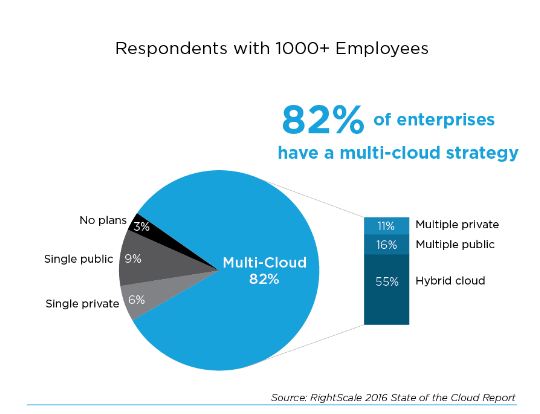
Multi-Cloud strategy

Projections from leading technology research company, Gartner, states that the public cloud market is expected to grow more than 17% by the end of 2016 to over $208 billion.

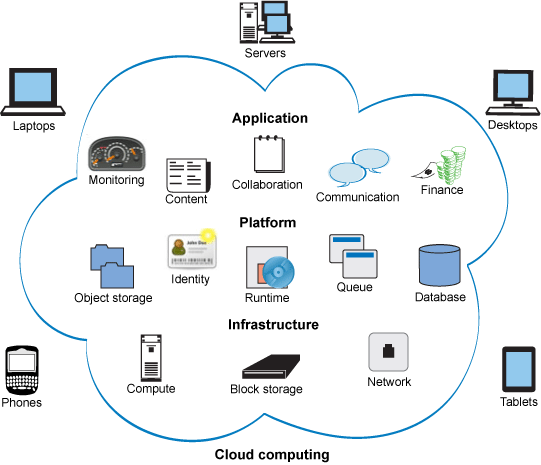
We have been writing a series of articles, one among which states the various cloud service layers. Among the three the ones that are most popular cloud services are Infrastructure-as-a-Service (IaaS), this offers virtual computing resources via the internet, and Software-as-a-Service (SaaS), this presents a platform to make, run, and manage applications.

Going for one Service over another will depend upon what the customer specifically needs and what supporting infrastructure or staff they have or why they need the service at all. It is quite common that large organizations have different vendors or service providers of the same field who have designated separate tasks to them.

The hotshots of the Publishing industry seems to have sided with AWS, Guardian for one says “Two or three years ago, before we were ready to move to AWS, we had to refresh the hardware in our data centres,” said Graham Tackley, director of architecture at The Guardian, speaking at the AWS Summit in London today. “We decided to build our own private cloud based on OpenStack. I would say it was a complete and total disaster. We invested a huge amount of effort.”

Writing for The Guardian's website in 2013, senior systems integrator, Stephen Gran, said OpenStack was chosen for the “best mix of features and developer mindshare”. “It has an EC2 API that is complete enough for our use cases, and offers an awful lot of flexibility in the native API and in deployment strategies,” he said.

How will you choose a service provider for Cloud Services?

There are a few things to consider, we have taken the most popular three of the market.

Evaluation Criteria

  • Baseline Criteria and Computation

AWS offers 40 max CPUs, Ma memory upto 24 GB, credit for 1+ minute downtime, 30% max credits, and uptime SLA 99.95%. Google offers 32 CPUS and memory upto 208 GB, Credits for 5+ consecutive minutes downtime, monthly credits up to 50% and 99.95% uptime SLA. Azure provides 32 CPUs and 448 GB memory, credits for 1+ minute downtime, monthly credits up to 25% and 99.95% uptime SLA same for all three.

  • Storage and Database

Azure offers archive storage, block storage, file storage, objecti storage and physical data transport which is offered by Azure as well. Google offers archive storage, block storage, file storage, object storage

  • Security and Access

AWS offers AD as a service, Certificate Management, Dedicated HSM, IAM, Key Storage and Management, Security Assessment, Web Firewall. Google offers IAM and Azure for AD as a service, IAM,  Key Storage and Management and Security Assessment

  • Service Offerings and Network

AWS’s core computational services include autoscaling which Azure offers as well, additionally AWS offers Dedicated Hosts(virtual), Temporary VMs while Google Cloud Platform offers Autoscaling, Customizable VMs and Temporary VMs

  • Data Analytics and Applications

AWS and Azure offers data and analytics services like Batch data pipelines, Machine learning, search and stream processing, while Google Cloud platform provides Batch data pipelines, Machine Learning and Stream Processing.

  • Price and Billing

The pricing totally depends upon use case scenarios. These are the areas where the decision has to be made. Whatever seems promising.

We have tried to paint a picture with the comparison metrics as we have spoken above, the competition is strong and with a focus on better service and ways to attract customers, pricing is getting down and becoming affordable. There are also a lot of other providers in market.

With this we end the series of Cloud Computing for Publishers.

Further reads : Rightscale

http://cloudacademy.com/blog/public-cloud-war-aws-vs-azure-vs-google/

Finding the right vendor for your Web development project - What matters?

They will tell you that their mission is to take excellence in support and customer experience to the next level. They will promise and that will have words like scalability and agility in that. But does that work for you?

We know you must have gone through enough projects over time so to be able to understand and list out the areas that you should focus on before you take on a new vendor or switch from one to another.

What exactly do you look for while selecting a vendor?

Size

Does the size of an organization really matter? You might get hold of a local 10 people company where they wholeheartedly work for your project. They are enthusiastic, hardworking and waiting for opportunities from someone like you. You can hire them for trying out a long term project as a test case.

Size
Image Credit

Generally you meet the CEO, he shows you the office, you meet the team they explain you things with jargons you probably miss, but then you get a mail from the 300 people company you had been working with who come in a quite expensive and are mostly impersonal. They use their standard email formats and it takes a lot of time to get things done.

And then you find the ones that come in between these both, they have more than a few people to work with, they are structured and they know their bit. Mostly it's these kinds of companies that seems to work with the most companies looking to get their work done.

Experience

How much work a company has done can give you a rough idea of the experience they have, the number of years is mostly a secondary factor. A case study or examples of the work they have done can show you actually what they are capable of.

Experience
Image Credit

Their websites might show you content that speaks volumes about the work they have done, but always for sure look into the previous experience and profiles of developers. Work out with them to run a test, do they go ahead and walk the extra mile?

References

Who has the company worked for? Do they have the kind of expertise you are looking for?

reference
Image Credit

Talk to someone from a former project they have worked on, know about the team you are evaluating about. They will of course come with recommendations and references, check with them

Location

With project management tools and remote options becoming easier and of a lower cost than onsite ones, you should seriously consider hiring a remote team.

Location
Image Credit

No resource drainage and a lot of revenue gets saved that you can put into better use. You do not have to worry about proving laptops or tea or coffee or sharing office space.

Management

How the company or the team that you would work with can make or break your project. Communication is the key to anything good.

management
Image Credit

While productive and quality work is a very necessary element when you outsource a part of your project, management of that work goes hand in hand.

Employees

Happy employees will have a lot less to complain and where positivity is high so is productivity, work will get done faster and changes will happen quicker.

Employees
Image Credit

Find out how the employees are rated, how they are treated, will give you an idea about how your project will be handed. It is nothing extraordinarily different in there.

Open Source Contribution Score

If your company deals in open source or you are into using FOSS, make sure to check their contributions. That speaks volumes.

foss
Image Credit

May be at times experience might fall short of what you were expecting but if they score a goal here, it is of worth to give it a shot.

How does the industry speak of them?

Mostly companies who deal and work with FOSS need to have an online presence in the community, there are companies who are spoken highly of because they know the value of collaboration.

reference
 Image Credit 

They give back, and they have a diverse range of tasks added to their profile as a badge of honour. Generally there will be founders who speak fondly about them and founding companies who showcase their tasks. What more to be vouched by the very people who own something that they work in.

With every vendor you will find it works like the Yin-Yang, there will be something good in the bad and something bad in the good. Your focus should always be work, but of course you will need to find what is worth compromising for. Check out if you still have doubts. Do not miss the next, we get into the nitty gritties of CMS for your website, cuz its all about content!

How to migrate Users from a CSV file in Drupal 8?

Migration has now become much easier in Drupal 8 compared to other previous Drupal versions. Because migration modules are in Drupal 8 core now, and it gives more flexibility to migrate the data into Drupal 8 from the previous Drupal 6 and 7 versions.  

User Migration in Drupal8 With migrate_source_csv Plugin.

In that, user migration is very important, especially if you are migrating from a Legacy system. For that, we are having a simple solution to get the users details as CSV file from the legacy system and migrate to Drupal 8. Here we are going to do the user migration from a CSV file. For doing that we need to do the following steps.

Step 1. Install the Contributed Modules required for the Migration.

We need to install Migrate Tools, Migrate Plus, Migrate Source CSV. By using drush and typing following you can install the module.

drush en migrate_tools -y 
drush en migrate_source_csv -y 

Step 2. Prepare the CSV file contains the User's data.

Here our CSV is...

Step 3. Create the Migrate configuration file and import the configuration

Create the migrate configuration files as like the following,

In migration, There are three things are the very important source, process, and destination.

Navigate to Administration > Configuration > Development > Synchronize (admin/config/development/configuration/single/import), select Migration under Configuration type and enter our migrate configuration into the Paste your configuration here window (note the absolute path to the .csv file) , and click import button.

Step 4. Go to terminal and run the following Drush commands.

  drush ms 
  drush mi demo_user_migration

No you can go back to the site and see the users by going to the path "admin/people"

Note:- When the Legacy users trying to log in, Force them to reset their passwords.

Please read more about password...https://www.drupal.org/docs/8/api/migrate-api/migrate-destination-entityuser

Other Resources : https://www.drupal.org/docs/8/upgrade/using-the-migrate-source-csv-plugin

FAQ:- Drupal 8 User Migration csv, How to add multiple role to a user?

Here our CSV is...

Create the migrate configuration files as like the following,

If you need any help to Upgrade Drupal 7 to 8, Feel Free to Talk to Us for your Enterprises

Mobile friendly site Vs Mobile app : Which is best for a media company?

A great percentage of users utilize tablets and smartphones to access news and other information as compared to desktops and laptop computers. This makes it essential for a media companies to have an appropriate layout for both tablet and smartphone users, so as to not miss out on potential and existing consumers. 

A well designed website should allow an user to easily search the website for what he/she is looking for. But making a compact and yet readable version of a complex website which media companies have, is a challenge. Mobile apps and mobile friendly website may look similar at first glance and choosing between the two or both depends on a number of factors like target audience, purpose, required features etc.

Before determining the right one for your company, you should evaluate the key differences between the two. A mobile friendly website contains the same content as the desktop version, it consists of the browser-based HTML pages accessed over the internet. The distinguishing characteristic from a desktop version of the size is that elements are placed in way to make it readable to the user in a smaller screen. Responsive web design is becoming a standard for new websites and also an important feature. The mobile friendly site can display the same content as on the desktop version, complete with text, images and videos if any. Additional features like click-to-call or location mapping can be added to the mobile friendly website.

Apps are applications downloaded and installed on to the handheld device, it is not rendered with a browser. Users visit app stores in order to find and download the app they are looking for. The app can pull data from the internet, similar to a website or it may download content so that it can be viewed without accessing the internet. 

If the primary goal is to market or publish communications and articles, a mobile friendly /responsive website is going to make better sense is should be the first priority to reach out the handheld device users. A mobile friendly website has broader accessibility, compatibility and is cost effective as compared to an app.

Let us consider some key advantages of a mobile friendly website:

  • Mobile websites are instantly available to users via browsers across a range of devices. Even a basic phone with access to internet can access a mobile friendly website. Apps on the other hand require particular system specifications and cannot run on devices apart from smartphones with the required features. Also, not all users are going to download apps for a specific media publication company and would prefer apps that congregate and compile news altogether for them - a significant barrier between initial engagement and action/conversion. It has a broader reach as compared to an app.
  • Mobile websites can be upgraded instantly without asking users for permissions. It is more dynamic in terms of flexibility to update content. Changes done on a website are immediately visible on the mobile site too. Apps update according to the user’s preference and may need user’s permission.
  • Finding a mobile website or a website in general is easier than finding an app. This is because of SEO and of course google search. More conversions happen via searches as compared to apps. It has a broader reach as compared to an app.
  • It is easy to share content from mobile websites by simply copying the url or the shareable link which might sometimes not be available for all the types of data on an app. Copying any type content from a website is a feature available in all smartphones and handheld devices.
  • Mobile websites cannot be deleted, they are always available. According to a recent research, the shelf-life of an app is pretty short (30 days), so unless the app is something truly unique and/or useful to the user, chances are that he/she will eventually delete it for more space.
  • With the trend of responsive websites, mobile friendly websites are cost effective and easier to develop as compared to a mobile app. Also the investments considering the troubleshooting, maintenance and updates, it is easier and more cost effective in the case of a mobile website.

So many negative points about mobile app? Do you really need one? Let us consider when a mobile app makes sense.

  • User interactivity: when you want the user to heavily interact with a particular set of information you are displaying, For eg: games, quizzes etc. apps make more sense.
  • For regular users when you want to provide them with personalized data.
  • When you want to provide the user with an option of saving content to the device or provide access during unavailability of an internet connection.
  • If you are providing the user with data that needs complex calculations, data manipulation, reports etc.
  • Access to camera.

Conclusion: The app vs web remains a confusing consideration for many organizations seeking to establish a mobile presence. If your goals are marketing driven or if the aim is to deliver content to a wide range of audience, which is easily maintained and easy to share between users, a mobile friendly website is a better option.

On the other hand, to provide a unique user experience with the use of specific programs and features like access to camera, saving content, offline access, a mobile app is a better choice. Plenty of organizations have both mobile friendly website and apps.

How can Publishers crack the Digital Transformation Code?

Most publishing enterprises are considering a Digital Transformation initiative and vendors across the world are mushrooming to take the leap from baby steps to actually helping out organizations in need. If the shot hits the bull’s eye you get to score, get nice commendations and all is good to go.

Companies these days are gearing to open up digitally evolved and advanced roles, as consumers are shifting focus from paper to the web. A research by MIT Sloan finds that despite the proliferation of digital roles and responsibilities, most executives recognize that their companies are not adequately preparing for the industry disruptions they expect to emerge from digital trends. Nearly 90% of respondents to a 2015 global survey of managers and executives conducted by MIT Sloan Management Review and Deloitte anticipate that their industries will be disrupted by digital trends to a great or moderate extent, but only 44% say their organizations are adequately preparing for the disruptions to come.

With terms like deliverability, scalability and user experience becoming the core areas of focus for online businesses and especially digital partners, business leaders want IT to work hand in hand with business, to give data driven predictions, take results on the same and move towards the path of continuous growth.

There are a lot of things to weigh on the scale, and to decide which could be sacrificed for the other.

Involvement Vs Output

How much involvement needs to be there also matters about how complex your system is going to be. The more the complexity the more the involvement might happen as there are a lot of factors that would need to be taken care of.  

Involvement Vs Output

cdn.pixabay.com

On the other hand, output and performance is one such factor that cannot be compromised with so publishers need to gear up to come to such kind of a solution that neither compromises output nor adds involvement

Infrastructure speed Vs infra reliability

In some of the articles that we have covered lately especially the ones about cloud computing we have come across in a lot of places about the importance of infrastructure, there happens instances when this becomes a huge downer and results into degraded experience for consumers.

Infrastructure

upload.wikimedia.org

Reliability is therefore very important to consider.

Uniformity Vs Flexibility

If technology is flexible and scalable it becomes easier for companies to move from one area to another, for expansion of business while if things are more uniform they are stable and have less ups and downs and less maintenance but comes at the cost of flexibility.

flexibility

upload.wikimedia.org

Carry Vs Keep

What to keep and what to take becomes a big problem  while digital transition is into play.

Keep

upload.wikimedia.org

Often business leaders focus on this areas as it can lead to drainage of resources that have been built up over the years.

Analysis

Calculating the return on investment is very important, you might be moving with a new vendor or a different technology but is that change giving you a better output than before?

Analysis

cdn.pixabay.com

People

The IT industry in terms with the Publishing industry has been changing from times unknown, every year things are changing, getting better speedier but the tenure of people in the industry is not changing that fast.

people

static.pexels.com

Hence investment has to be done in training the resources, employees will help in the move only if they are aware.

To fully utilize the full potential that lies underneath, these are a few things that needs  to be taken care of. Business leaders want IT to be focused on business results, innovation, and continuous improvement and growth. Opportunities of digitized technologies and their effect in a strategic and focused way can open gates beyond knowledge. There are a lot of ways your business can be benefited. Find out with us.

5 Things to know about Cloud if you are in Publishing

As Cloud computing garnered year-over-year traction in the enterprise world, companies have wondered if it would suit the needs of these organisations and if it is as a matter of fact doing today, how smooth would the transitions be. For over a series of articles we have been exploring and touching the areas that require the most of the attention when it comes to Cloud Computing Technology for the Media and Publishing houses.

In this latest article we plan to cover the summarized version of the previous articles and sum it up. Starting from the first article, we have explored 4 areas to begin with.

We have understood,

#1 What do Publishers’ have on their plate?

Streamlining it to the main categories

  • Enhancing experience for the consumers
  • Increase Revenue without compromise in business
  • Manpower Cost cut down

We have discussed that whether Cloud can be a solution to a particular firm will depend on the way the business and technology is. Each each Media and Publishing enterprise function differently and Cloud computing will not necessarily be a game changer on its own. But together with the integration and experimentation will emerge out to be one of the forerunners in scalability and match the speed with which consumers are absorbing experience.

#2 Who uses Cloud?

Discussed some of the big names in Media associated to Cloud - Time Inc.

#3 What benefits can Cloud provide?

  • Handling disruptions
  • Handling traffic demand
  • No infrastructure maintenance
  • Improve infrastructure without people
  • No people maintenance
  • Reduced Software Costs
  • Improved and Fast updates
  • Unlimited storage space
  • Worldwide accessibility without costs to set up data center

Understood,

#4 Different Cloud Technology Stack

Iaas - Infrastructure as a Service
Paas - Platform as a Service
Saas - Software as a Service

Discussed,

#5 Security issues with Cloud

Cloud computing vulnerabilities

When deciding to migrate to the cloud, we have to consider the following cloud vulnerabilities:

  • Session Riding
  • Virtual Machine Escape
  • Reliability and Availability of Service
  • Insecure Cryptography
  • Data Protection and Portability
  • CSP Lock-in
  • Internet Dependency

Cloud computing threats

Before deciding to migrate to the cloud, we have to look at the cloud security vulnerabilities and threats to determine whether the cloud service is worth the risk due to the many advantages it provides. The following are the top security threats in a cloud environment:

  • Ease of Use
  • Secure Data Transmission
  • Insecure APIs
  • Malicious Insiders
  • Shared Technology Issues
  • Data Loss
  • Data Breach
  • Account/Service Hijacking
  • Unknown Risk Profile
  • Denial of Service

With a brush up in understand the above points, we have summarized whatever we have discussed in the series of articles that we have been seeing from last week. For the next and the last article we plan to bring up a comparison of the companies that are offering Cloud Computing services to these organizations.

For further reads :
http://www-935.ibm.com/services/multimedia/fr_FR_Cloud_Computing_for_Media.pdf
http://cloud-computing.tmcnet.com/

Image Credit : http://blog.udn.com/jason080/9401738

Disclaimer: Screenshots, logos and other identification used in this article belong solely to the companies they represent.

Create Custom content type programmatically using Configuration API in Drupal 8

Drupal 8 has quality of utility tool could help anyone to develop custom module box. One of the tool is Drupal Console, where any developer can follow the Terminal Command and generate the boilerplate for source code. Which help us to reduce time to write chuck line of code. And also help us to overcome with error rate to produce zero marginal error. Kind of typo & syntax error ;) . if you haven’t aware of Drupal Console then just go through it by installing on your local Drupal 8 instance. For fresh code like creating block or user or view or node I will suggest you boilerplate code. But as a New learner my suggestion would be always to write line by line code.

Here is the command that you need to generate Custom Content type using Drupal Console  generate:entity:bundle [options]

This article is specifically for Custom Content Type creation in Drupal 8. Most of the time developer don’t like to use Admin UI, just to get the better flexibility and hands on self-constructed content type. So the only way to achieve this by creating new Content type as a module and keep on adding own choice of attributes.

To begin with this tutorial I assume reader has basics. Even if you don’t have I will make sure to go through each one of them. So without wasting time let’s start.

Prerequisites: 

  • Drupal 8 installed.
  • Custom module “creates any module with your choice of name”. 

Creating custom content type required multiple YAML files contain necessary configuration. In this tutorial we are going to create one content type called “Book_detail” with two default fields title and body.

Step 1: Create .info.yml file as in Drupal every module is initialized with this info file. Kind of mandatory for module. Now .module is no longer necessary to create a custom module. We can proceed without .module also.

As you can see .info.yml file has module name, type[new in D8], description, core, & dependencies. Let us know about module name, what is the type, description, core compatibility & if has any dependency respectively.

Step 2: Creating a Custom content type.
Folder structure: book_detail /config/install/node.type.book_detail.yml

Step 3: Adding field to the content type. Currently we are adding body field to our custom content type.
Folder  structure : book_detail/config/install/field.field.node.book_detail.body.yml

Step 4: This file is about teaser view of custom content type.
Folder  structure : book_detail /config/install/core.entity_view_display.node.book_detail.teaser.yml

Step 5: This files holds default display of custom content type.
Folder  structure : book_detail /config/install/core.entity_view_display.node.book_detail.default.yml

Step 6: This file tells how form should be displayed when creating a new node from custom content type.
Folder  structure : book_detail/config/install/core.entity_form_display.node.book_detail.default.yml

As you can see I used minimal no of configuration file where developer should be able to create custom content type with teaser view, default view, form display, body field, node type and info file. If you go to each code snapshot there is not much to describe but I will do it for you.


On node.type.book_detail.yml

  1. langcode: langcode stands for language code. If langcode is NULL the current content language is used.
  2. dependencies:It's advisable to add enforced dependency to custom module. if you won't add this to module, Drupal will not remove content type while uninstalling.
  3. name:Name of the Content type

     Book Content type
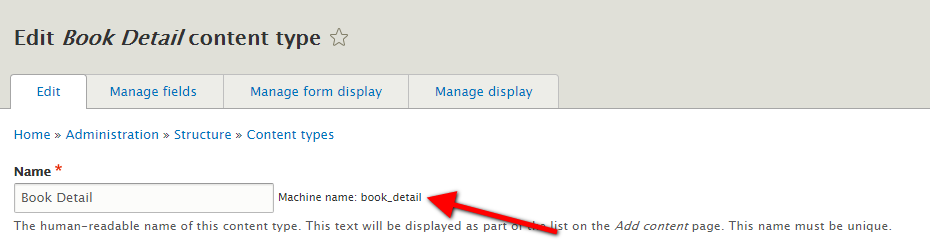
  4. type: machine name of Content type.Content type machine name


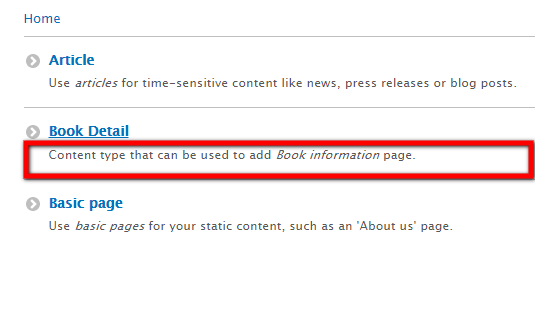
  5. description:Content type short description on content type listing page.
     

    Content type description


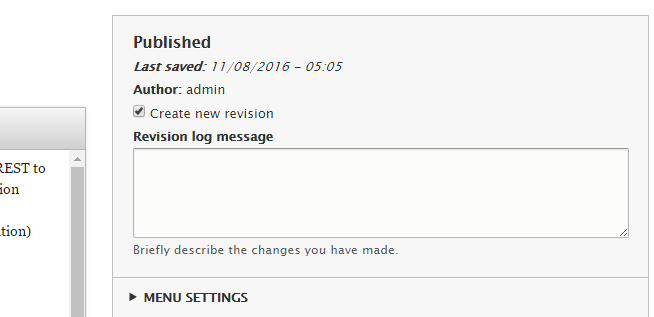
  6. new_revision: Allow admin to SET  "create new revision" option
     

    Content type revision


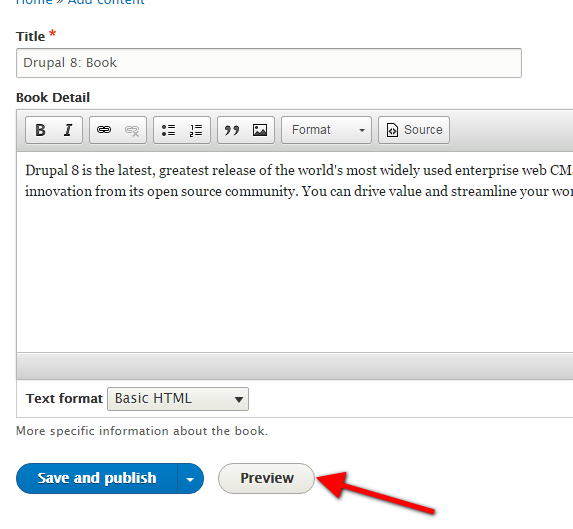
  7. Preview_mode: Allow author to “preview” node option before submission.
     

    Content type preview mode


On “field.field.node.book_detail.body.yml”  you will find  language, status  and dependencies using field.storage.node.body & node.type.book_detail with module text which defines simple text field types.

id: node.book_detail.body
This attribute represent field ID.

field_name : body
name of the field, which is ‘body’

entity_type: node
Tells whether this field belongs to which entity.  As we mentioned it node.

bundle: book_detail
This field belongs to Custom content type ‘book_detail’

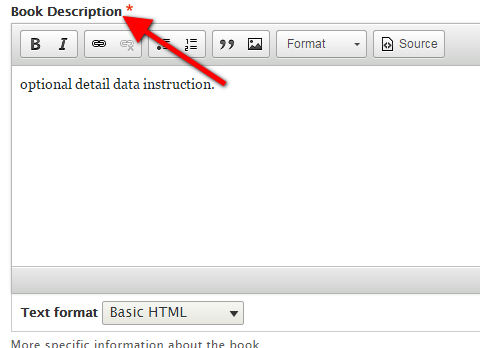
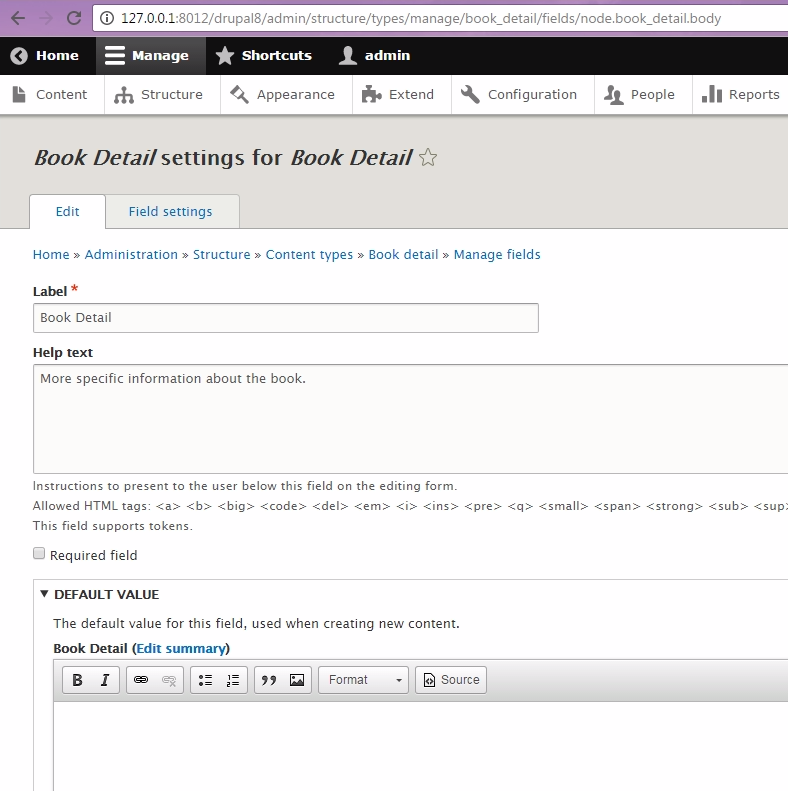
label: 'Book Description'
The field label name.

Book Content type body label name


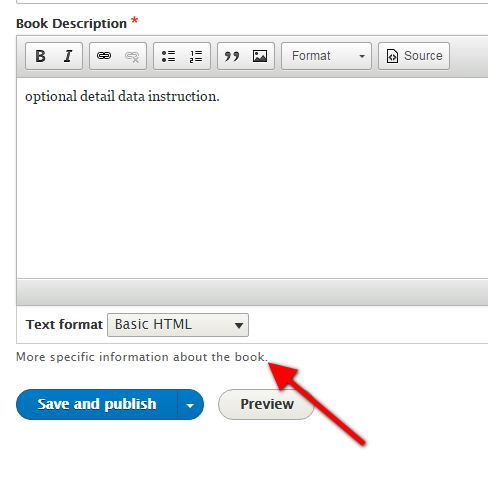
description: 'More specific information about the book.'
The short description of the field.
 

Book Content type body description

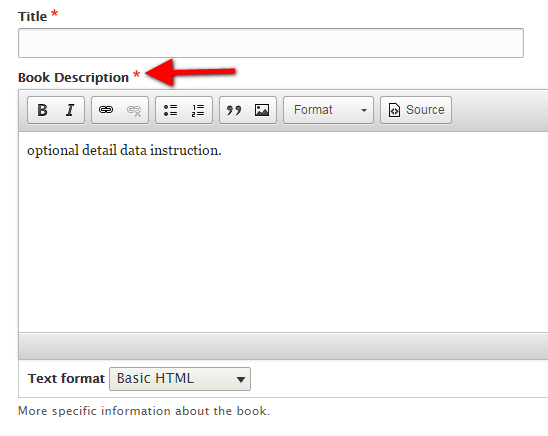
required: true
We can make body field mandatory too, by setting the required value true or false.
 

Book Content type body field mandatory

translatable: true
To make the content type translatable we can set the value true false.


default_value: { }
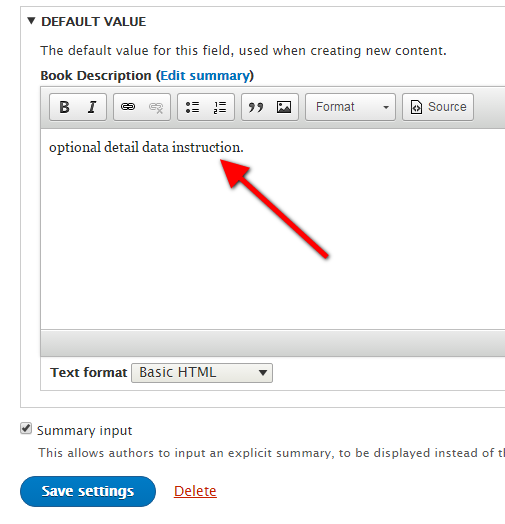
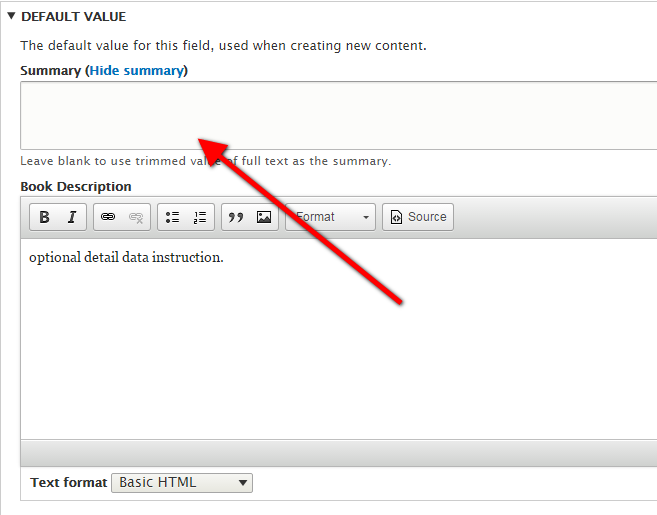
If you really wish to pre define default text  for body section, you can fill up value here

ex:  default_value: 'optional detail data instruction.'

for null value
default_value: {  }
This is how it has to display default value on back end as well as in front end.
 

Book Content type body default value

display_summary: true
Displaying summarized value of body text. We can enable/ disable it by making field value true/ false.
 

Book Content type body field display summary

field_type: text_with_summary
This is one of the type of Text field where site admin can configure own choice of text input type. So we need to pass field value on field_type.

Drupal 8 provides 6 different type of text field and they are:

  • Text (plain, long)
  • Text (formatted, long, with summary)
  • List (text)
  • Text (formatted)
  • Text (formatted, long)
  • Text (plain)


Book content type back end


field_name: body with field_type: text_with_summary, with bundle: book_detail, label: ‘Book Detail’, description, made field is not required, translation Is ON, default value is blank, display_summary  is TRUE


body field listing under book content type

On core.entity_view_display.node.book_detail.default.yml &  core.entity_view_display.node.book_detail.teaser.yml  used  to display  default & teaser view of the node. The only difference in both the files that teaser has dependency of core.entity_view_mode.node.teaser with unique id for each one of them. targetEntityType: node,  bundle is own custom content type.  Mode is different for teaser and default.  Content body has hidden label as we do on manage field, with weight and trim length.

Almost every attributes is being covered earlier, but some of theme I would like to elaborate here. They are “Content “ under this you will find the list of the field need to be display on default & teaser view with weight order label, type of display, third party settings.
There is one section called hidden: { } , currently it is blank but if you really want to hide some of the field from display then you can mentioned those fields over here.

Syntax:       hiding two fields  url / Autored on
                      hidden:
                                 created: true
                                 field_pointing_urls: true


in case we have nothing to hide, make it blank
                     hidden: {  }

On core.entity_form_display.node.book_detail.default.yml has langcode, status with dependencies of config file field.field.node.book_detail.body.  unique id, targetentityType :node, bundle: book_detail, mode is default, content has body with hidden label, text with summary and weight.

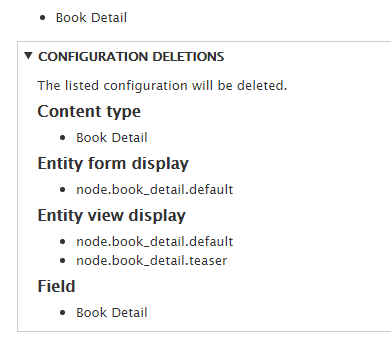
Now we have all of the configuration files in place, we need to inform Drupal about our new custom content type. This is done just by enabling module. If your module was already enabled, uninstall the module and enable it again.

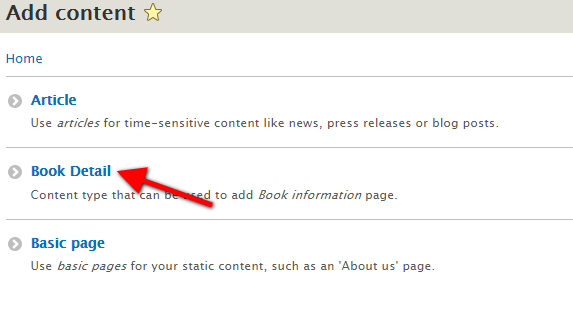
If you now go to the Create content page, you will see that you're able to create a new node of the content type "Book Detail".

Custom content type configuration files

Conclusion: This Article covers basics of Custom Content type creation using configuration API, where we have created Custom Bundle with a body field. And also gives you little knowledge on  different view of node includes teaser and default. My suggestion would be to get more hands on experience on these custom bundle creation, you can create content type from Admin UI, with few different variety of field, add a field level configuration to the same with manage display. Export / import the configuration back & forth and see the changes. I belief it will help a lot to get the better understanding on various attributes.

Source Code: https://github.com/xaiwant/D8CustomContentType.git

Why big government websites are switching over to Drupal

The open source Drupal CMS powers some of the biggest government websites. Now what do government websites and media & entertainment websites have in common? A lot of functionalities and end goals are similar. Media websites have subscription forms, personalized data delivery, large data warehouses, events and related forms, publishing tools, marketing tools, transactions etc.

The Georgia Technology Authority was running 65 state government websites on two different versions of proprietary software - Vignette 6 and Vignette 7, one of which is no longer supported. It had become cumbersome and expensive. Apart from that, moving all the 65 sites to Vignette 8 was too much of a hassle. CTO Steve Nichols says, “As we dug in, all the obvious best choices were open source,”. The most obvious and the strongest of those contenders turned out to be Drupal, which powers Whitehouse.gov and other key federal government sites. For a new CMS for all the 65 websites there were two important criteria to be met. First, it had to be a complete enterprise solution and second was the need to move off the proprietary model which is too expensive. Another criteria was the major market share. 

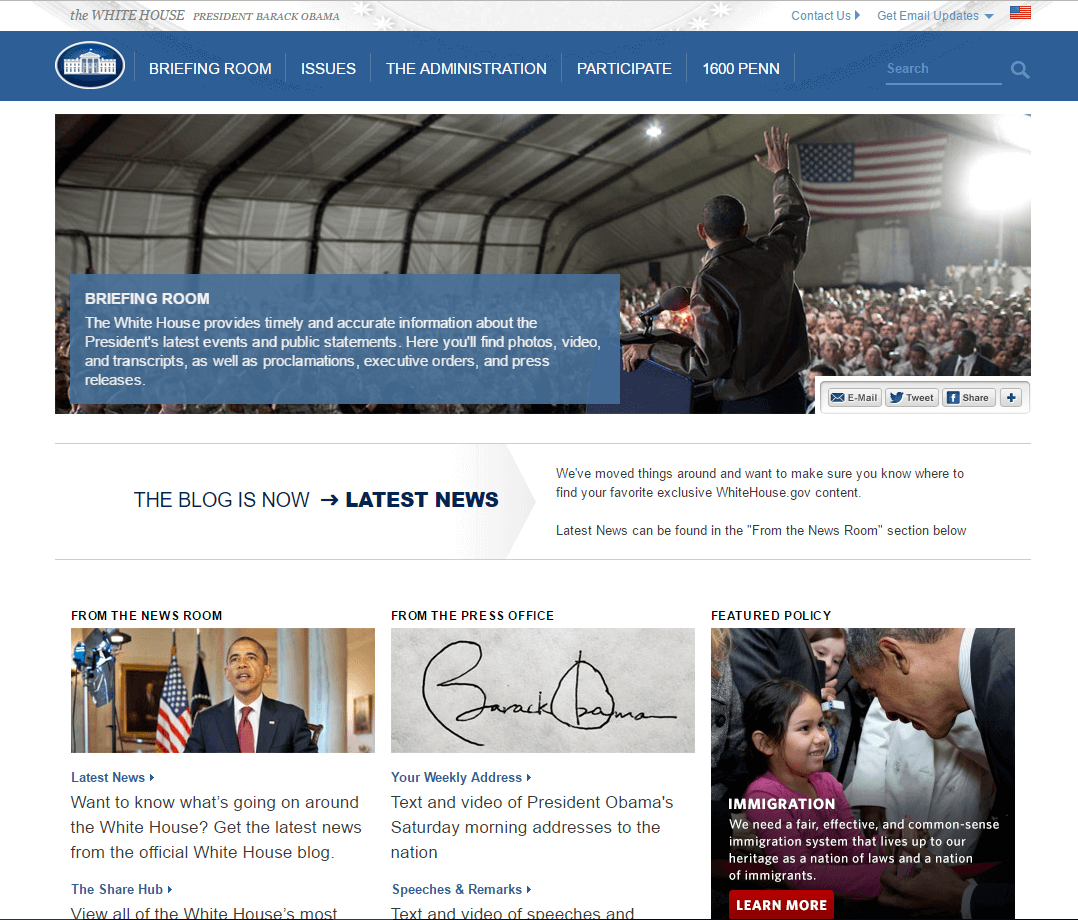
layout of whitehouse.gov


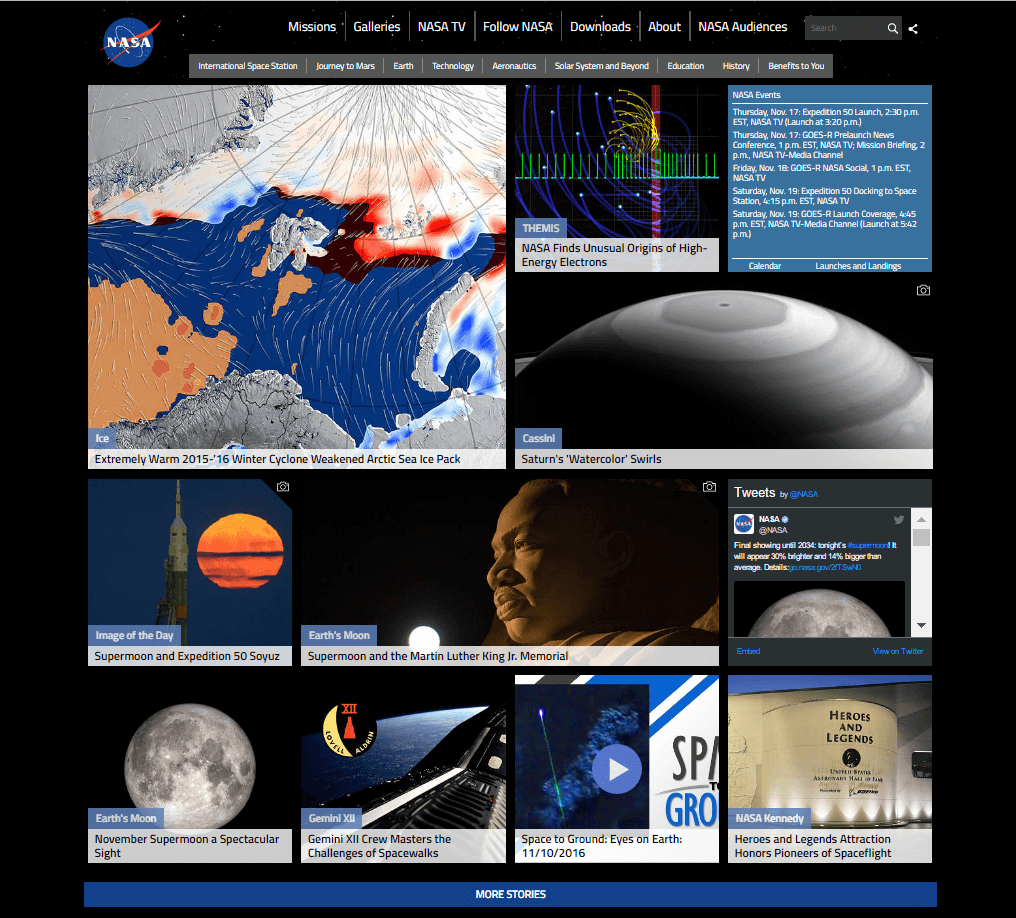
Excepting it’s popularity in the private sector, Drupal has an enormous market share in government as well as the public sector in general. Over 150 of the federal government sites are using Drupal, the list includes biggest sites like the white house, NASA, Department of education, Department of energy, Health, Defense, Transportation, Agriculture and even the Department of homeland security. In 2009, it was decided to migrate whitehouse.gov and all it’s associated sites to Drupal. This perhaps, gave the open source platform its sizable credibility and confidence to other government agencies to follow to same route.

When big government sites like whitehouse.gov and NASA, which store huge amounts of data, prefer Drupal, it’s no wonder that many other private media companies are following the suit for their own websites.

layout of NASA.gov


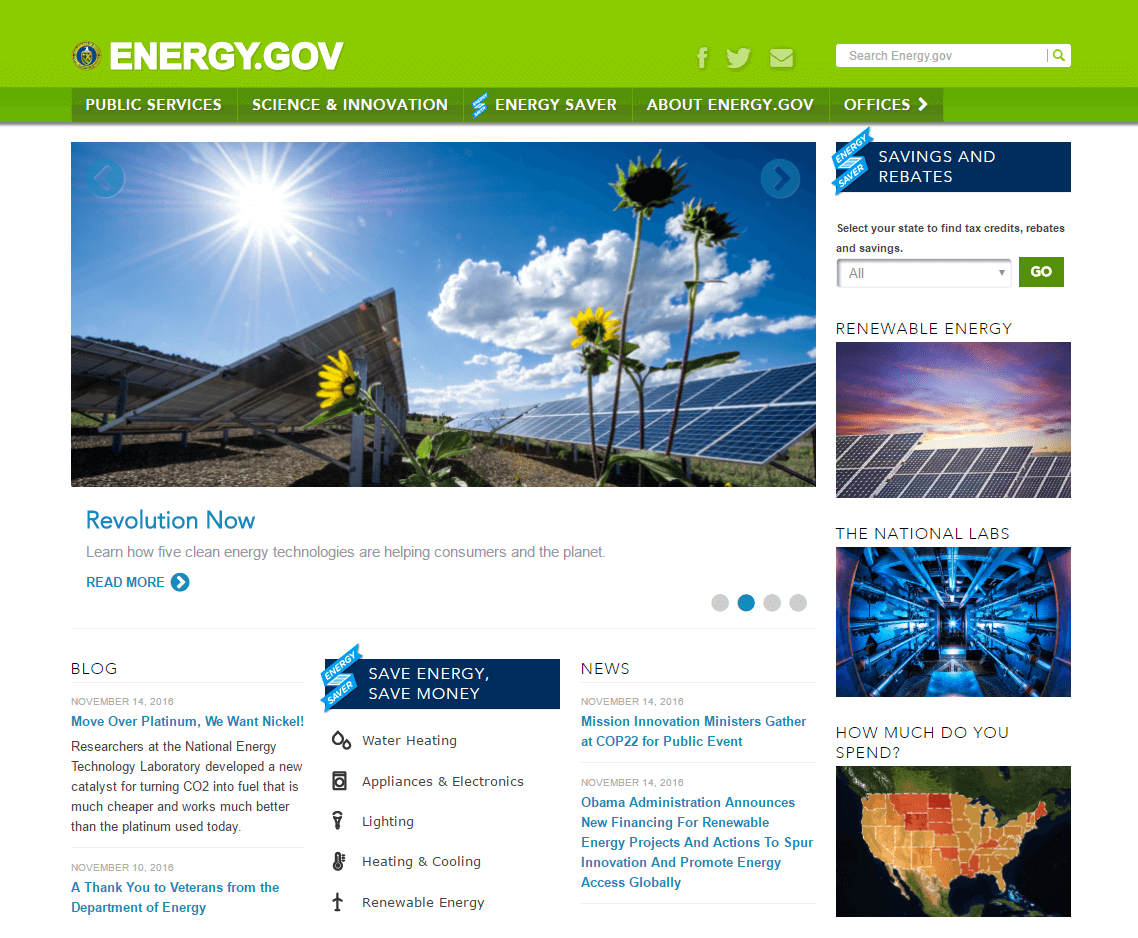
The department of energy decided to migrate their website to drupal when they felt that their website, energy.gov, needed immediate attention. They were facing typical problems like low traffic, high bounce rate and the website design was built based on an internal office structure which was troublesome to navigate. “The prior CMS supporting Energy.gov was outdated,” said Cammie Croft, director of new media and citizen engagement for the department’s Office of New Media. She also mentions that the Energy Department had a lot of outdated technologies.

Cammie Croft sought for a platform that would be scalable and be able to adapt to a number of requirements which would be the current needs and those yet to be discovered. A platform that would capacitate the Energy department and allow it to evolve and expand as quick as user’s needs. After the completion of migrating the energy.gov to Drupal, it resulted in cost savings upward of $10 million annually. This was achieved by consolidation of duplicative digital technology platforms, internal hosting along with the new Drupal platform to circulate information, rather than building new stand alone websites.

layout of energy.gov
Drupal is used and maintained by a community of more than 630,000 global users and developers. Drupal is free for download, use and share under the terms of GNU General Public Licence. At the most basic level, Drupal wins the financial part of the argument because of it’s open source model. Drupal spares the users from expensive licensing fees and proprietary lock-in. As a result the saved costs can be reallocated to other departments and functionalities, adding value in other areas. “With Drupal, agencies can share and reuse code, reducing labor costs, and drastically accelerate the pace with which every agency can innovate.” said Kurt Voelker, CTO of Forum One Communications, the vendor behind a Drupal build for the International Programs Center of the U.S. Census Bureau. After the White house chose Drupal as it’s platform for development, debates and criticism surrounding the security and compliance issues do not have much clout. Drupal has made major accomplishments on security and compliance issues along with constantly sticking to strict best practices and also access to all the source code for auditing purposes.

Albeit there are many companies which are still wary of Drupal, mainly because of the fear of giving up reliance on proprietary solutions like Sharepoint and completely migrating to a LAMP stack solution, or requirement for different set of skills for maintaining a completely different  and complicated platform integration. Another blocker commonly faced is the reluctance to move agencies in the midst of long term contracts for windows software as many own sharepoint as an existing deal.

But Drupal’s ability to integrate is “limitless,” said Treehouse Agency’s Caccavano. “It is very compatible with other solutions and services. That’s probably one of its greatest strengths.” Proprietary solutions for CMS like Sharepoint, will likely coexist Drupal and other open source platforms. Microsoft was listed as one of the only three leaders by Gartner in its ‘Social software in the Workplace Magic Quadrant’ in September. Gartner predicts that more enterprises will use Sharepoint to enable social solutions as compared to any other platform. Because of Sharepoint’s popularity and established name in the marketplace, clients are ready to pay the licensing and maintenance fees rather than opting for the open source platforms. Drupal can be easily adjusted to a very large as well as small deployments is because it works on a modular system. In Drupal, “Distributions” are sets of modules, functionalities and features created for a specific audience. OpenPublic, an open source CMS based on Drupal, created by Phase2 Technology is a good example of a distribution catering specifically to the needs of government. 

The outlook for Drupal is positive, considering its extraordinary growth within the public sector. Apart from the reasons why government websites prefer Drupal, there are plenty other features Drupal has to offer which easily facilitate a big and complicated website which require complicated systems. With the release of Drupal 8 in 2015, there is a lot of flexibility in terms of grouping functions and inheriting or deriving particular characteristics which one would want to repeat in different parts of the website. 

Disclaimer : Screenshots, logos and other identification used in this article belong solely to the companies they represent.
Image credit - JuralMin

How can Drupal be used to develop data driven web applications?

Everything about building a website or a web application is not just coding and hosting an app. It includes a thorough ecosystem research and co-designing a scalable product to cooperate and compete within the networked internet of things. Drupal is the perfect platform to build large systems like CRM system or ERP system, which is complicated as well as data oriented.

The data acquired is first organized appropriately and then analyzed to make essential business decisions. Various underlying platforms serve critical aspects in the complete system, which work really well with applications developed with Drupal.  Management, governance and security are always on the top of the list when it comes to media and entertainment companies.

Building a complex website with Drupal is like a ladder worth climbing. You will have complete access to modules created by some of the most sought after developers in the world also, your website will run on a CMS that is designed for maximum scalability, customization and reliable maintenance. You can get endless features with Drupal using the horde of modules available, many of which are maintained by professional developers. Read more about reducing costs with big data.

How can Drupal facilitate a complicated data oriented website?  Let us look into some key features that Drupal has to offer.

CONTENT TYPES: With content types and views you can build easy to use forms that will aggregate the information entered, in all the required places. For example, when a user wants to add a new event to the site, they can fill out a simple form which will mainly include fields for the title, long or short descriptions or both, venue, date and time, duration of the event and the required Call-to-Action links. After the user submits the information, all the pieces of information are put in their rightful place including a brief introduction in the calendar, full description on the events page and a teaser on the homepage.

The same concept is used for  any type of content one would like to apply onto their website. User types, products, ads, teasers etc.

FLEXIBILITY: Drupal is a really flexible platform. The right developers can shape the system into whatever you need. It is configured to suit your needs today and also scalable to a large extent to facilitate your future needs.

SECURITY: Drupal has a really good track record in terms of being secure. It has an organized process for verifying, investigating and publishing possible security issues.
It has a dedicated team which is constantly working with the community to address security issues and they come up. 
Members of the security team sometimes perform analyses of core or contributed project code, especially if there is a weakness that can be found by easy scanning. 

SCALABILITY: If your website gets hit with a lot of traffic, it is possible that your site can go down and it won't matter even if you are delivering the world’s best digital experience. Drupal has the capability to keep your website running when you are really popular. More than a million sites are powered by Drupal worldwide for eg: Grammy awards and NBC Olympics because the get hit with traffic bursts at times. Drupal’s scalability ensures that your site will perform fabulously and always run on turbo mode even on the busiest days. 

Drupal is a great choice for for sites that will continue to grow over time. The perfect example would be examiner.com which keeps growing.

ROBUSTNESS: Apart from its scalability, Drupal platfrom is quite capable and it can handle a small mom-and-pop marketing brochure websites to huge data oriented sites like grammy.com (which can handle millions of users on the website within a period of two hours without crashing or even a glitch). No matter what size project you are looking at, Drupal is quite adequate and efficient to handle it.

FLEXIBLE FRAMEWORK: Rather than just a CMS, Drupal is a flexible framework. Drupal offers a solid foundation of solutions that majority of websites and web systems require. you can build on top of that to create any application that you require. Additionally, once the system is built in Drupal, not only can you bolt on new features in the future, there is a large community of users out there that can pick up where one left off.

OPEN SOURCE COMMUNITY:
The Drupal community is massive and very active. Of all the technology communities with which We’ve interacted, not one matches the Drupal community. Everyone is focused around the act of sharing and helping their fellow Drupal users grow. Rarely does one stumble across someone that isn’t willing to share or educate. And most of the time the answer to one of your questions (challenges) is just a Google search away. This helps shorten development time so that your websites are up and running quickly even if you come across a challenge. 

Here are some real-world examples of using Drupal for Big Data in action:

  • Consumer product companies and retail organizations are monitoring social media like Facebook and Twitter to get an unprecedented view into customer behavior, preferences, and product perception.
  • The government is making data public at both the national, state, and city level for users to develop new applications that can generate public good. 
  • Financial Services organizations are using data mined from customer interactions to slice and dice their users into finely tuned segments. This enables these financial institutions to create increasingly relevant and sophisticated offers.
  • Advertising and marketing agencies are tracking social media to understand responsiveness to campaigns, promotions, and other advertising mediums.
  • By embracing social media, retail organizations are engaging brand advocates, changing the perception of brand antagonists, and even enabling enthusiastic customers to sell their products.
  • Web-based businesses are developing information products that combine data gathered from customers to offer more appealing recommendations and more successful coupon programs.

To conclude, Drupal is the most sought after platform to build complicated data oriented systems by larger companies. It can power small to large sized businesses alike. It has a great open source community. It’s features like security and scalability are more advanced as compared to the other content management platform and development framework providing companies. It can be incorporated with big data management and is the perfect platform for it because of it’s robustness.
 

Download the Drupal Guide
Enter your email address to receive the guide.
get in touch